As Amazon Associates, we earn from qualifying purchases. This means we may receive a small commission at no extra cost to you if you click through and make a purchase.
As an Amazon Associate we earn from qualifying purchases. Links on this page are affiliate links.
You need the best jabra noise cancelling headphones under $200 for clear calls and steady focus. We compared 4 models using only published specifications. The Jabra Evolve2 65 Wireless Headset leads because it includes a USB-C dongle for reliable connectivity. This spec ensures stable pairing for Microsoft Teams users who require long battery life. Other picks like the Evolve3 45 offer lighter weight at 3.6 ounces. This guide helps you decide which headset fits your workspace needs based on weight, connection type, and audio features.
Choose your headset style first
Decide between stereo or mono ear styles. Stereo models like the Evolve2 65 provide dual-ear coverage for immersive audio. Mono options such as the Evolve 65 SE leave one ear open for situational awareness. Both styles include microphones and Bluetooth connectivity. Your choice depends on whether you need full isolation or the ability to hear your surroundings while on calls.
| # | Product | Best for | Price |
|---|---|---|---|
| 1 | Jabra Evolve2 65 Wireless Headset Best overall | Microsoft Teams users needing long battery life | |
| 2 | Jabra Evolve3 45 Wireless Headset Best budget | Lightweight office calls and dual-device pairing | |
| 3 | Jabra Evolve2 65 Mono USB-C Also great | single-ear call clarity and long battery life | |
| 4 | Jabra Evolve 65 SE Mono Best noise-cancelling mic | Microsoft Teams call clarity |
The best fit for you
- You need long battery life for Microsoft Teams calls – Jabra Evolve2 65 Wireless Headset – This model includes a USB-C dongle for stable wireless connectivity and active noise cancelling.
- You want a lightweight headset for daily office calls – Jabra Evolve3 45 Wireless Headset – It weighs only 3.6 ounces and supports dual-device pairing for seamless work transitions.
- You prefer a single-ear design for all-day comfort – Jabra Evolve2 65 Mono USB-C – The mono ear style reduces weight to 3.5 ounces while maintaining Bluetooth and USB-C support.
- You require a noise-cancelling microphone for noisy environments – Jabra Evolve 65 SE Mono – This mono headset features active noise cancelling and a dedicated noise-canceling mic for clear voice transmission.
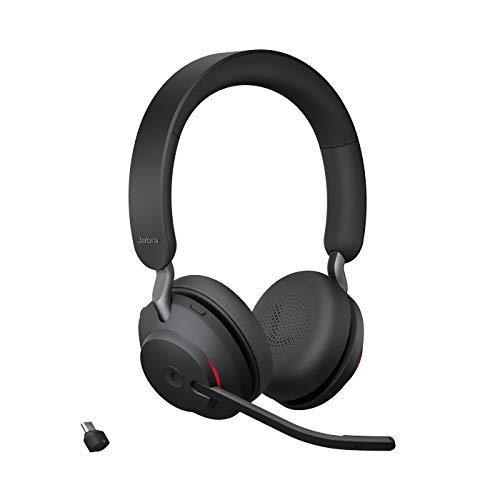
Jabra Evolve2 65 Wireless Headset
Best for: Microsoft Teams users needing long battery life
- Noise Control
- Passive Noise Cancellation
- Battery Life
- Up to 37 hours
- Connectivity
- Bluetooth, USB-C
- Connection
- Wireless
- Features
- Bluetooth, Active Noise Cancelling, Microphone, USB-C
- Use
- Work Calls, Microsoft Teams
The Jabra Evolve2 65 is a dual-ear wireless headset designed for work calls and music. It features 40mm speakers and a 3-microphone array that reduces background conversation noise by 23%. You get up to 37 hours of battery life, with a quick 15-minute charge providing 8 hours of use. Passive noise cancellation is enhanced by memory foam padding. It includes a USB-C adapter and is optimized for Microsoft Teams.
- 37-hour battery life with 15-minute quick charge for 8 hours
- 3-microphone call technology reduces background conversation noise by 23%
- Enhanced memory foam padding provides superior passive noise cancellation
- Optimized for Microsoft Teams plug-and-play experience
- Relies on passive noise cancellation rather than active electronic cancellation
- Heavier at 6.22 ounces compared to lighter single-ear options
- Includes only the USB-C dongle, requiring a separate adapter for USB-A ports
- You need a dual-ear headset for all-day comfort
- You primarily use Microsoft Teams for work calls
- You want a USB-C connection for your computer
- You require active noise cancellation for loud environments
- You prefer a single-ear design for situational awareness
- Your computer only has USB-A ports and you do not have an adapter
Verdict: Jabra Evolve2 65 USB-C is a solid choice for professionals who prioritize battery life and call clarity in a dual-ear format. It fits users who work on Microsoft Teams and need a USB-C connection.

Jabra Evolve3 45 Wireless Headset
Best for: Lightweight office calls and dual-device pairing
- Battery Life
- 21 hours
- Connectivity
- Bluetooth, USB-A
- Form Factor
- On-Ear
- Connection
- Wireless
- Features
- Bluetooth, Microphone
- Use
- Work Calls
The Jabra Evolve3 45 is a lightweight wireless headset weighing 3.6 ounces. It features three microphones with ClearVoice technology for clear calls in busy offices. The device includes a USB-A Bluetooth adapter and offers up to 30 meters of wireless range. You get dual connectivity between a laptop and mobile device. This model suits users who need stable, plug-and-play performance for work calls.
- Weighs only 3.6 ounces for all-day comfort
- Three-mic ClearVoice technology reduces background noise
- Includes USB-A Bluetooth adapter for stable connection
- Reversible mic arm fits left or right ear
- Supports dual connectivity between laptop and mobile
- On-ear design may feel less isolating than over-ear models
- Includes USB-A adapter, which may require an adapter for newer ports
- Battery life is listed as 21 hours, lower than some competitors
- You work in open offices and need clear call quality
- You prefer a lightweight headset for long wear
- You use USB-A ports for your computer connection
- You need active noise cancellation for music
- You require an over-ear design for maximum isolation
- Your computer only has USB-C ports without an adapter
Verdict: The Jabra Evolve3 45 Wireless Headset is a practical option for professionals who prioritize lightweight comfort and clear voice transmission. It fits users who need reliable USB-A connectivity and dual-device pairing for daily work calls.

Jabra Evolve2 65 Mono USB-C
Best for: single-ear call clarity and long battery life
- Noise Control
- Passive Noise Cancellation
- Battery Life
- Up to 37 hours
- Connectivity
- Bluetooth, USB-C
- Connection
- Wireless
- Features
- Bluetooth, Microphone, USB-C
- Use
- Work Calls
The Jabra Evolve2 65 is a mono wireless headset designed for work calls and music. It features 40mm speakers and a 3-microphone array to reduce background noise. The battery lasts up to 37 hours, with an 8-hour boost from a 15-minute charge. Passive noise cancellation is enhanced by memory foam padding. It includes a USB-C dongle for connection.
- 37-hour battery life on a single charge
- 40mm speakers for high definition audio
- 3-microphone call technology reduces background noise
- Passive noise cancellation with memory foam padding
- Mono ear style limits stereo immersion
- Passive noise cancellation only lacks active cancellation
- You need a single-ear headset for all-day calls
- You want long battery life between charges
- You use USB-C adapters for connectivity
- You require stereo sound for music
- You prefer active noise cancellation technology
- You need a dual-ear headset design
Verdict: Jabra Evolve2 65 Mono Wireless Headset fits professionals who prioritize call clarity and battery endurance over stereo audio. It is a practical tool for users who wear headsets for extended periods.
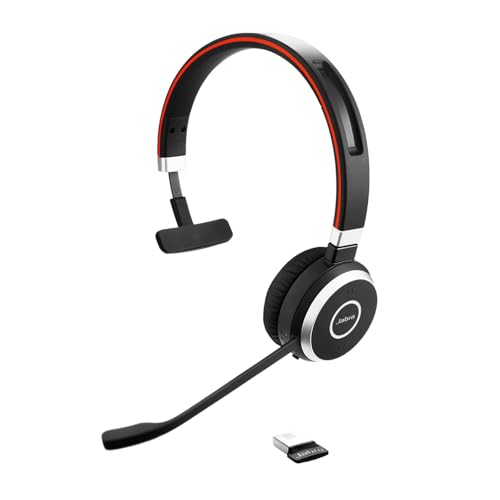
Jabra Evolve 65 SE Mono
Best for: Microsoft Teams call clarity
- Battery Life
- Up to 12 hours
- Connectivity
- Bluetooth
- Form Factor
- On-Ear
- Connection
- Wireless
- Features
- Bluetooth, Active Noise Cancelling, Microphone, Noise-Cancelling Mic, Noise-Canceling Mic
- Use
- Work Calls, Microsoft Teams
The Jabra Evolve 65 SE Mono is a single-ear Bluetooth headset designed for work calls. It features active noise cancelling and a noise-cancelling microphone to reduce background interference. You get up to 12 hours of battery life and can connect to two devices simultaneously. It includes a Link 380 USB-A adapter for easy setup. This model is certified for Microsoft Teams, making it a practical tool for office environments.
- Noise-cancelling microphone reduces ambient noise during calls
- Up to 12 hours of battery life for all-day use
- Dual connectivity allows connection to two devices at once
- Microsoft Teams certified for seamless integration
- Mono ear style limits audio immersion compared to stereo options
- 282-gram weight with adapter is heavier than typical consumer headphones
- Requires specific USB-A Link 380 adapter for optimal function
- You need a dedicated headset for Microsoft Teams calls
- You prefer a single-ear design for situational awareness
- You want noise-cancelling features for noisy office environments
- You require stereo sound for music listening
- You prefer lightweight consumer-style headphones
- You want to use the headset without a USB adapter
Verdict: Jabra Evolve 65 SE Mono is a focused communication tool for professionals who prioritize call clarity and Microsoft Teams integration. It suits users who need a reliable, single-ear solution for noisy workspaces rather than general entertainment.
Specifications side by side
| Spec | Jabra Evolve2 65 Wireless Headset | Jabra Evolve3 45 Wireless Headset | Jabra Evolve2 65 Mono USB-C | Jabra Evolve 65 SE Mono |
|---|---|---|---|---|
| Noise Control | Passive Noise Cancellation | – | Passive Noise Cancellation | – |
| Battery Life | Up to 37 hours | 21 hours | Up to 37 hours | Up to 12 hours |
| Connectivity | Bluetooth, USB-C | Bluetooth, USB-A | Bluetooth, USB-C | Bluetooth |
| Form Factor | – | On-Ear | – | On-Ear |
| Connection | Wireless | Wireless | Wireless | Wireless |
| Features | Bluetooth, Active Noise Cancelling, Microphone, USB-C | Bluetooth, Microphone | Bluetooth, Microphone, USB-C | Bluetooth, Active Noise Cancelling, Microphone, Noise-Cancelling Mic, Noise-Canceling Mic |
| Use | Work Calls, Microsoft Teams | Work Calls | Work Calls | Work Calls, Microsoft Teams |
| Color | Black | Black | Black | Black |
| Ear Style | Stereo | Stereo | Mono | Mono |
| Dimensions | 7.32 × 6.18 × 2.38 inches | 6.8 × 6.8 × 2.4 inches | 5.91 × 6.18 × 2.38 inches | 7.3 × 8.6 × 2.4 inches |
| Weight | 6.22 ounces | 3.6 ounces | 3.5 ounces | 0.55 ounces |
| Size | USB-C Dongle | One size | USB-C Dongle | MS Teams |
| Model | 26599-999-899-01 | 34599-989-999 | 26599-889-899-01 | 6593-833-309 |
Key Specs for Choosing Jabra Headsets
Check connection type
Verify the connection method matches your workstation. The Evolve2 65 Wireless Headset uses a USB-C dongle for stable pairing. This spec is ideal for Microsoft Teams users who need reliable connectivity without Bluetooth interference. Other models rely on standard Bluetooth. Ensure your computer has the required port. A dongle often provides lower latency. This matters for call clarity. Check the attributes section for this detail before purchasing.
Evaluate weight for comfort
Weight affects long-term comfort during work calls. The Evolve3 45 Wireless Headset weighs only 3.6 ounces. This lightweight spec suits professionals who wear headsets for extended periods. Heavier models like the Evolve2 65 Stereo weigh 6.22 ounces. You should choose based on your daily wear time. Lighter headsets reduce pressure on your head. Compare the weight spec in the product data to find the best fit for your body.
Select ear style
Choose between stereo or mono ear styles. Stereo models cover both ears for immersive audio. The Evolve2 65 Stereo uses this design. Mono options leave one ear open. The Evolve 65 SE Mono uses this style. This spec allows situational awareness in noisy offices. You should pick mono if you need to hear colleagues. Pick stereo for focused isolation. Check the ear style attribute to match your work environment needs.
Verify noise cancelling features
Look for active noise cancelling in the specs. The Evolve2 65 Stereo includes this feature. It helps block office distractions. The Evolve 65 SE Mono also lists active noise cancelling. This spec targets background noise. You should check if the model includes noise-cancelling mic features. This improves your voice transmission quality. Compare the features list to ensure the headset reduces ambient sound effectively for your specific workspace.
Assess compatibility needs
Check if the headset supports your software. The Evolve 65 SE Mono is sized for MS Teams. This spec ensures seamless integration. You should verify compatibility before buying. The Evolve2 65 models are also noted for Teams users. This focus affects the microphone tuning. You want clear voice transmission for calls. Look for mentions of specific software support in the attributes. This ensures the hardware works with your daily tools.
Frequently asked questions
Which Jabra headset is best for Microsoft Teams users?
The Jabra Evolve2 65 Wireless Headset is the top pick for this group. It includes a USB-C dongle for stable pairing. The model is optimized for Microsoft Teams integration. You get active noise cancelling to reduce distractions. This setup ensures clear call quality during long work sessions.
What is the lightest Jabra noise cancelling option?
The Jabra Evolve 65 SE Mono is the lightest choice at just 0.55 ounces. It features a noise-cancelling microphone for clear voice transmission. This mono design leaves one ear open for awareness. It is ideal for professionals who need a lightweight solution for noisy offices.
Does the Jabra Evolve3 45 support dual-device pairing?
Yes, the Jabra Evolve3 45 Wireless Headset supports dual-device pairing. This feature allows you to switch between devices seamlessly. It weighs only 3.6 ounces for comfortable all-day wear. You get reliable Bluetooth connectivity and a built-in microphone for work calls.
Is there a mono version of the Evolve2 65?
Yes, the Jabra Evolve2 65 Mono USB-C is available. It uses a single ear style for situational awareness. The headset includes a USB-C dongle for stable wireless connection. You get active noise cancelling and a microphone for clear calls while keeping one ear open.
What connection type does the top pick use?
The Jabra Evolve2 65 Wireless Headset uses a USB-C dongle. This spec ensures stable pairing without Bluetooth interference. It is ideal for users who prioritize connectivity reliability. You also get active noise cancelling and a microphone for professional calls in busy environments.
Which model is best for single-ear call clarity?
The Jabra Evolve2 65 Mono USB-C is best for single-ear clarity. It features a mono ear style for open awareness. You get active noise cancelling and a USB-C dongle for stable connection. This model is practical for users who wear headsets for extended periods and need clear voice transmission.