As Amazon Associates, we earn from qualifying purchases. This means we may receive a small commission at no extra cost to you if you click through and make a purchase.
Choosing the right kingston dual portable ssd requires balancing cross-device flexibility, desk organization, and transfer speeds. In modern workspaces where setups combine USB-C notebooks, legacy USB-A desktop towers, and mobile devices, transferring large files without adapter dongles simplifies daily routines. Kingston solves this workflow friction with two distinct product designs: direct-plug drives that integrate dual physical connectors into a thumb-drive chassis, and ultra-compact external drives utilizing detachable cables. Deciding between them depends on whether you value cord-free convenience or a stable desk footprint.
This roundup examines four Kingston models: the Kingston 1TB Dual USB-A C Portable, the Kingston 2TB Dual USB-A C Portable, the Kingston XS1000 1TB SSD, and the Kingston XS1000R 1TB SSD. While all four utilize USB 3.2 Gen 2 technology to hit read speeds up to 1050MB/s, their mechanical formats differ substantially. The dual-connector drives discard cables completely by combining Type-A and Type-C plugs into a metal thumb drive, while the XS1000 family uses a pocket-sized enclosure connected via external leads. Here is how they compare for your desk setup.
Which Kingston Portable SSD Should You Buy
- Kingston 1TB Dual USB-A C Portable: Fits hybrid professionals and students moving documents between legacy USB-A desktop PCs and modern USB-C laptops without cables.
- Kingston 2TB Dual USB-A C Portable: Fits mobile video editors and photographers needing double the storage volume for large media archives in a cable-free build.
- Kingston XS1000 1TB SSD: Fits home office setups where a flat, pocket-sized drive rests on a desk mat without crowding neighboring laptop ports.
- Kingston XS1000R 1TB SSD: Fits multi-purpose workflows and gaming setups requiring an ultra-compact wired drive with an included cable and adapter.
Measure shown: Size (TB). Every figure is the number the seller publishes on that product page — nothing on this site is measured by us. Longest bar is highlighted.
01 Kingston 1TB Dual USB-A C Portable

Best for: Cable-free hybrid port workflows
Pros
- Integrated dual USB connectors
- Durable metal casing
- Fast USB 3.2 Gen 2
Cons
- May crowd adjacent laptop ports
The Kingston 1TB Dual USB-A C Portable offers a streamlined approach for users seeking to eliminate loose cords and dongles. Camouflaged as a traditional thumb drive, this kingston dual usb-a c portable ssd integrates both a USB Type-A connector and a USB-C connector on a single, rigid enclosure. Leveraging USB 3.2 Gen 2 performance, it delivers data transfer rates up to 1,050MB/s read and 950MB/s write, moving multi-gigabyte video files, presentations, and archives between machines in seconds without external power or setup accessories.
In a typical workspace, this kingston dual interface ssd excels when bridging different hardware generations. You can plug the Type-A plug into an office desktop, transfer large spreadsheets or creative files, and plug the Type-C side directly into ultrabooks like asus zenbook ultralight laptops. The durable metal casing protects the internal components during daily commutes. However, because this 0.3-inch thick drive plugs directly into the host port, it may overlap closely spaced adjacent ports on compact laptops, where a cabled model like the XS1000 would offer better port clearance.
- Dual USB Type-A and USB-C connectors for direct, cable-free cross-device transfers
- USB 3.2 Gen 2 bus speeds reaching up to 1,050MB/s read and 950MB/s write
- Durable metal casing engineered for rugged daily transport and travel
- 1000 GB digital storage capacity configured for business and multimedia workflows
02 Kingston 2TB Dual USB-A C Portable

Best for: High-capacity mobile media backups
Pros
- Generous 2000GB digital capacity
- Integrated dual USB connectors
- Rugged metal construction
Cons
- Direct plug can crowd ports
For creators handling extensive photo libraries, 4K footage, or system image backups, the Kingston 2TB Dual USB-A C Portable doubles the digital capacity while keeping the identical pocketable footprint. Delivering 2000 GB of solid-state storage within a thumb-drive form factor, it reaches transfer speeds up to 1,050MB/s read and 950MB/s write over USB 3.2 Gen 2. It requires no cords or adapters, letting you plug directly into laptops, desktop towers, and mobile devices on demand.
Within our broader kingston 2tb ssd comparison, this model ranks as a premier choice for mobile field production. Its sturdy metal body absorbs everyday drops and bumps while assisting with passive heat dissipation during sustained transfers. The dual-connector design allows frictionless handoffs between legacy editing workstations and USB-C portables. The main ergonomic trade-off is port spacing: hanging a rigid 2TB drive off a compact laptop port can leave little room for nearby display cables, making a tethered desktop drive preferable for permanent, stationary connections.
- Expansive 2000 GB capacity suited for heavy multimedia, business, and personal storage
- Dual physical USB-A and USB-C connectors eliminating external cords and adapters
- USB 3.2 Gen 2 transfer rates reaching up to 1,050MB/s read and 950MB/s write
- Durable metal casing providing physical defense and passive heat management
03 Kingston XS1000 1TB SSD

Best for: Minimalist desktop workstation setups
Pros
- Ultra-compact pocket design
- Cable-based port clearance
- Up to 1050MBps read speed
Cons
- Requires carrying external cable
The Kingston XS1000 1TB SSD departs from the direct-plug design in favor of an ultra-compact pocket-sized external drive format. Delivering read speeds up to 1050MB/s and media transfer rates of 1000MB/s across a USB 3.2 Gen 2 connection, this lightweight drive connects to laptops and desktops via external cabling. Its 1 TB storage capacity provides plenty of space for routine file backups, project folders, and media collections while maintaining an incredibly small, unobtrusive footprint on your desk.
From a desk setup perspective, the XS1000 prevents the port congestion often seen with direct-plug solid-state drives. Because it connects over a short lead, the main drive body rests flat on your desk pad or workstation surface, avoiding mechanical leverage on your laptop socket. When evaluated against portable competitors like an ssk external hard drive, the XS1000 stands out for its minute featherweight profile. The concession is that you must carry a cable; mobile minimalists working on tight lap surfaces may prefer the cable-free dual models.
- Compact pocket-sized form factor that rests flat beside laptops and desktop docks
- USB 3.2 Gen 2 interface achieving read speeds up to 1050MB/s and 1000MB/s media speeds
- Wired USB-A and USB-C connectivity preventing mechanical strain on host computer ports
- 1 TB digital storage capacity dedicated to multi-purpose daily backups and archiving
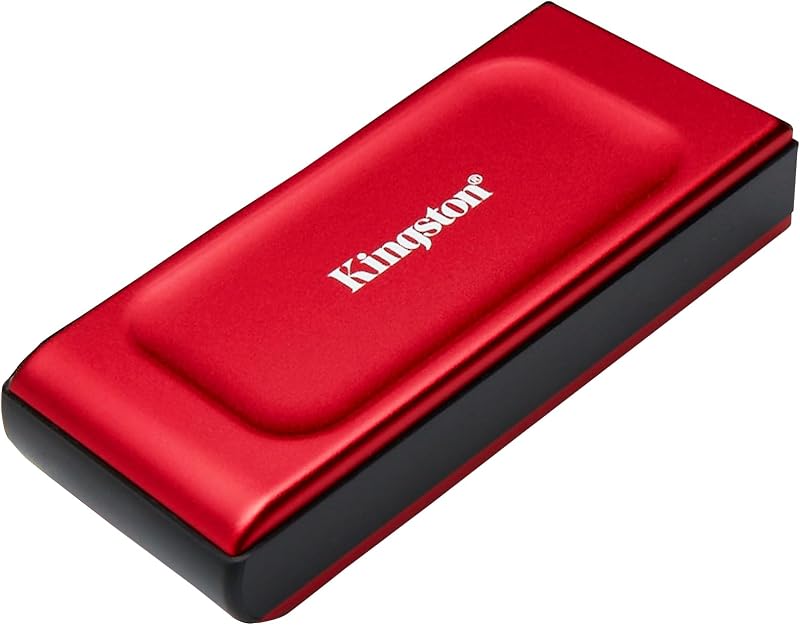
04 Kingston XS1000R 1TB SSD
Best for: Gaming and multi-platform daily backups
Pros
- Included cable and adapter
- Pocket-sized lightweight body
- Multi-purpose gaming support
Cons
- Requires external cable connection
The Kingston XS1000R 1TB SSD shares the compact pocket-sized architecture of its sibling while focusing on versatile multi-platform deployment. Rated for business, personal, and gaming use cases, this external solid-state drive achieves read transfer rates up to 1050MB/s and media speeds of 1000MB/s or higher over USB 3.2 Gen 2. Its 1 TB storage volume easily accommodates game installations, creative assets, and large administrative backup archives without weighing down your daily commuter pack.
A key advantage of this model is its complete accessory package. The listing explicitly includes both a connecting cable and an adapter, ensuring out-of-the-box compatibility with both USB Type-C and USB Type-A devices. When evaluated alongside general market options like a samsung external hard drive, the XS1000R delivers a remarkably tiny footprint that fits neatly next to a gaming console or desktop dock. If you need a stable cabled drive with all necessary adapters supplied, the XS1000R is an excellent workstation match.
- Pocket-sized 2.5-inch class form factor tailored for business, gaming, and personal data
- High-speed USB 3.2 Gen 2 bus delivering read rates up to 1050MB/s and 1000MB/s+ media speeds
- Included cable and adapter for immediate connection to both USB-C and USB-A devices
- 1 TB digital capacity suited for gaming libraries and comprehensive document backups
What Sets These Models Apart
A direct kingston portable ssd comparison highlights that while all four models feature USB 3.2 Gen 2 speeds up to 1050MB/s, they accommodate different physical workflows. The Dual USB-A C portable drives focus on cable-free convenience with integrated connectors, whereas the XS1000 series prioritizes desk ergonomics and cable-based flexibility. The comparison table below summarizes the key technical and functional differences to help clarify which kingston portable ssd to buy.
| Model | Form Factor & Connectivity | Capacity | Stated Read & Write Speeds | Best Setup Role |
|---|---|---|---|---|
| Kingston 1TB Dual USB-A C Portable | Direct thumb drive; Dual USB-A and USB-C plugs | 1000 GB | Up to 1050MB/s read, 950MB/s write | Quick file transfers between mixed-generation ports |
| Kingston 2TB Dual USB-A C Portable | Direct thumb drive; Dual USB-A and USB-C plugs | 2000 GB | Up to 1050MB/s read, 950MB/s write | High-capacity mobile media storage and backups |
| Kingston XS1000 1TB SSD | Pocket-sized external drive; Wired USB-A / USB-C | 1 TB | Up to 1050MB/s read, 1000MB/s media speed | Minimalist desktop workstation backups |
| Kingston XS1000R 1TB SSD | Pocket-sized external drive; Included cable & adapter | 1 TB | Up to 1050MB/s read, 1000MB/s+ media speed | Versatile multi-platform computing and gaming |
Buying Tips for Kingston Portable SSDs
When shopping for the best kingston portable ssd, port spacing on your primary computer should guide your choice. Direct-plug dual-interface drives remove cable clutter completely, but their rigid thumb-drive chassis can obstruct neighboring ports on ultrabooks and compact hubs. If your daily workstation relies on closely grouped ports for external monitors, charging cords, or wireless dongles, a cabled drive like the XS1000 provides necessary clearance by resting on your desk pad away from the machine edge.
Consider your cross-device transfer habits. If your workflow requires moving files regularly between older desktop towers featuring standard USB-A ports and modern USB-C laptops or tablets, the dual-connector design eliminates the hassle of tracking down adapters. However, if your external drive will remain mostly stationary as a dedicated backup repository for a home office PC or gaming console, a cabled drive offers greater physical stability and reduces accidental strain on the host port.
Lastly, evaluate your storage capacity requirements realistically. A 1000 GB drive provides ample space for office documents, photo archives, and standard computer system backups. If your daily routine involves storing high-resolution video footage, extensive RAW image collections, or multiple large project databases, opting for a 2000 GB model like the Kingston 2TB Dual USB-A C Portable ensures you will not face storage capacity constraints as your media library expands over time.
FAQ
How does a Kingston dual portable SSD differ from a standard flash drive?
While a Kingston dual portable SSD looks like a regular thumb drive, it uses solid-state drive architecture over USB 3.2 Gen 2. This delivers read speeds up to 1,050MB/s and write speeds up to 950MB/s, which are significantly faster than traditional flash drives. Its integrated dual USB-A and USB-C connectors also allow direct connections across different hardware without extra adapters.
Can Kingston portable SSDs be used across both Windows and Mac workstations?
Yes, Kingston portable drives work with both Windows and macOS systems. When formatted with a cross-platform file system like exFAT, you can plug either the dual-interface drives or the XS1000 series into a Windows PC or Mac laptop to transfer files seamlessly without installing additional drivers.
What is the primary advantage of the XS1000 series over the Dual USB-A C models?
The primary advantage of the XS1000 series is its detached cable design. By resting flat on your desk via a flexible cable, the drive body does not block neighboring ports on slim laptops, reducing mechanical torque on your computer’s connection socket during daily use.
Does the Kingston XS1000R 1TB SSD come with connection cables?
Yes, the product listing for the Kingston XS1000R 1TB SSD specifies that it includes both a connection cable and an adapter. This out-of-the-box bundle allows immediate compatibility with both USB Type-C and USB Type-A host devices.
How do I decide between a 1TB and 2TB Kingston portable SSD?
A 1TB (1000 GB) capacity is ideal for typical office documents, personal photo libraries, and operating system backups. If you handle 4K video editing, heavy gaming libraries, or massive RAW photo archives, choosing a 2TB (2000 GB) drive provides the necessary headroom for sustained long-term storage.