As Amazon Associates, we earn from qualifying purchases. This means we may receive a small commission at no extra cost to you if you click through and make a purchase.
Finding the right predator gaming monitor involves balancing raw refresh speed, visual fidelity, and physical desk ergonomics to support both intense competitive sessions and everyday productivity. Today’s high-performance monitors must do more than deliver fluid frame rates; they anchor your workstation, define your posture through adjustability, and dictate how effectively you manage multi-window workflows. Whether you prioritize the instant response of quantum dot OLED panels for high-stakes gaming or the pixel density of Ultra HD IPS panels for editing and spreadsheet work, matching the hardware to your physical workspace ensures you get the most out of your setup.
This comprehensive guide examines exactly 6 models from the Acer Predator display family, highlighting their distinct design philosophies and core specifications. Across this lineup, you will find differences in panel technology spanning fast IPS to cutting-edge QD-OLED, refresh rates climbing from 160Hz up to 300Hz, and form factors ranging from compact 24.5-inch tournament screens to an expansive 34-inch curved ultrawide. By breaking down pixel response times, stand flexibility, video connectivity, and integrated desk tools, this guide helps you determine which Acer Predator display panel, resolution, and refresh rate match your desk ergonomic space and daily multi-use requirements.
Which Acer Gaming Monitors Should You Buy
- Competitive esports players seeking instant pixel transitions and deep 1440p contrast should choose the Acer Predator 26.5in QHD 2560×1440 QD-OLED.
- Hybrid professionals requiring sharp 4K text rendering alongside high-refresh versatility will appreciate the Acer Predator 27″ 4K 3840×2160 IPS.
- Fast-paced tournament gamers focused on maximum frame throughput on compact desks should select the Acer Predator Gaming Monitor with 300Hz Full HD capability.
- Gamers seeking dual-mode flexibility between 4K resolution and high-speed motion in an eco-conscious package will favor the Acer Predator XB273K V5 27in Gaming.
- Console and PC power users who require HDMI 2.1 bandwidth and certified HDR True Black performance should opt for the Acer Predator Gaming Monitor with FreeSync Premium Pro.
- Multitaskers, creators, and simulation enthusiasts looking to streamline their workspace with USB-C docking will thrive with the Acer Predator 34in WQHD 3440×1440 OLED.
01 Acer Predator 26.5in QHD 2560×1440 QD-OLED

Best for: Esports competitors wanting fast 1440p OLED response
Pros
- 240Hz refresh rate
- 03ms pixel response time
- 99% DCI-P3 color gamut
Cons
- Moderate screen brightness
- Requires image retention maintenance
The Acer Predator 26.5in QHD 2560×1440 QD-OLED brings tournament-grade speed and top-tier color accuracy to standard 16:9 desk arrangements. Built around a 26.5-inch quantum dot OLED panel, this monitor operates at a native resolution of 2560 x 1440 with a blisteringly fast 240Hz refresh rate. The standout specification is its 0.03ms gray-to-gray response time, which virtually eliminates trailing behind fast-moving targets. To preserve display health across extended daily use, Acer integrates an automated Image Retention-Refresh system, while AMD FreeSync Premium keeps frames synchronized with your graphics card to avoid screen tearing.
This model is built specifically for competitive esports enthusiasts who want to upgrade their visual fidelity without compromising on motion clarity or frame pacing. With true 10-bit color, 99% coverage of the DCI-P3 color space, and a factory calibration rating of Delta E under 2, creative professionals can comfortably review media files during working hours before switching over to competitive shooters in the evening. The ZeroFrame chassis eliminates thick plastic borders, maximizing visible screen area while facilitating clean side-by-side positioning in multi-monitor setups. For further panel performance analysis, see our acer predator monitor oled comparison.
While this display excels at esports pacing and pure color saturation, its physical footprint measures 12.32 inches deep by 24.04 inches wide, requiring adequate desk depth to prevent visual fatigue. It yields to the 4K models in this lineup when a user requires absolute pixel density for dense spreadsheet work or fine image editing, and steps aside for the curved 34-inch ultrawide when a wraparound field of view is prioritized for productivity.
- 26.5-inch WQHD (2560 x 1440) quantum dot OLED panel with matte screen finish
- Blazing 240Hz refresh rate backed by an ultra-responsive 0.03ms gray-to-gray pixel response
- DCI-P3 99% wide color gamut, true 10-bit depth, Delta E under 2, and HDR10 support
- AMD FreeSync Premium synchronization and dedicated Image Retention-Refresh technology
02 Acer Predator 27″ 4K 3840×2160 IPS

Best for: Hybrid desk workers wanting dual-mode 4K clarity
Pros
- Dual Frame Rate 320Hz mode
- Crisp 4K UHD resolution
- Remote Acer Smart Dial
Cons
- Lower 400-nit HDR contrast
- Limited 90% DCI-P3 gamut
The Acer Predator 27″ 4K 3840×2160 IPS delivers a flexible dual-personality display tailored to both detailed digital work and intense gaming. Known internally as the acer predator xb273k v5 platform, this monitor features a 27-inch IPS panel with a native 3840 x 2160 Ultra HD resolution running at a fluid 160Hz over DisplayPort or HDMI. For fast-paced tactical games where frame rate trumps resolution, the display features Dynamic Frequency and Resolution (DFR) technology, allowing gamers to switch to a 1920 x 1080 Full HD resolution at a rapid 320Hz refresh rate.
Designed for hybrid professionals, this predator 4k gaming monitor provides exceptional clarity for text processing, coding, and graphic layouts through its 90% DCI-P3 color coverage and VESA DisplayHDR 400 certification. The included ErgoStand provides comprehensive freedom of movement, allowing users to swivel, pivot into portrait orientation, and adjust height to align with natural eye levels throughout long sessions. Eye comfort is further augmented by Acer VisionCare, which helps mitigate eye strain during long gaming or editing periods. A unique desk quality-of-life feature is the Acer Smart Dial, an ergonomic desktop control that allows users to adjust on-screen display settings like brightness and volume remotely without reaching behind the panel.
This monitor is an ideal fit for desk workers who need sharp 4K definition by day and high-speed motion by night. However, with its 0.5ms GTG response time and IPS contrast, it yields to the OLED-based Predator models when deep black levels and instantaneous 0.03ms pixel transitions are required in darkened gaming rooms.
- 27-inch 4K UHD (3840 x 2160) widescreen IPS panel with matte anti-glare coating
- Dual Frame Rate capability switching between 4K at 160Hz and Full HD at 320Hz
- ErgoStand design providing full height, swivel, and pivot adjustments alongside Acer VisionCare
- Acer Smart Dial remote control for quick on-screen adjustments and customizable hotkeys
03 Acer Predator Gaming Monitor

Best for: Console and PC enthusiasts needing HDR peak brightness
Pros
- 1000 nits peak brightness
- FreeSync Premium Pro VRR
- True Black 400 contrast
Cons
- Higher chassis weight
- OLED pixel care required
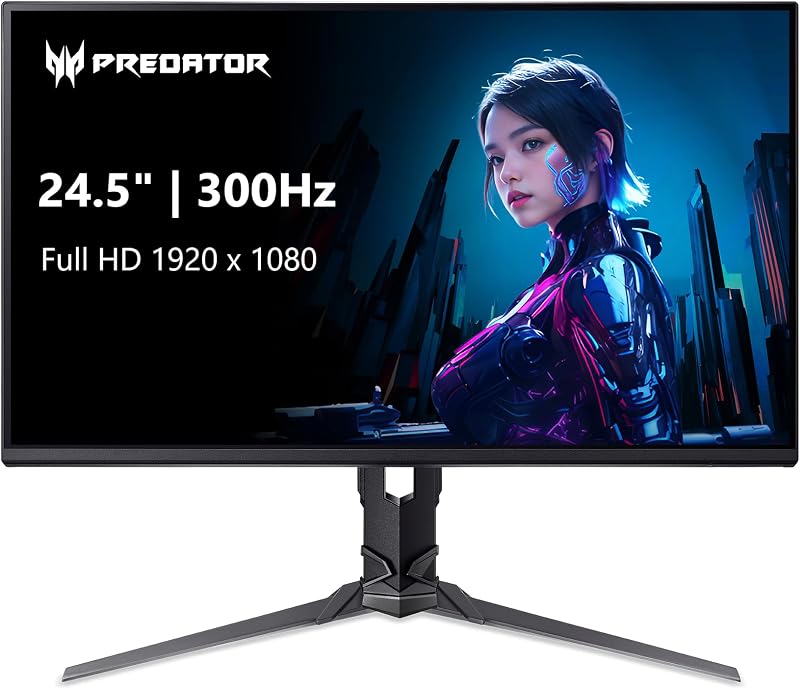
Best for: Competitive gamers needing high-speed 300Hz motion
Pros
- Rapid 300Hz refresh rate
- Full ErgoStand adjustability
- 99% sRGB color accuracy
Cons
- Standard 1080p resolution
- Modest 250-nit panel brightness
The Acer Predator Gaming Monitor, carrying the model designation XB253Q Fbmiiprx, is designed specifically for tournament environments and fast-paced competitive gameplay. Built around a 24.5-inch Full HD (1920 x 1080) IPS panel, this display pushes motion fluidity to extreme levels with a native refresh rate of up to 300Hz. Paired with a 1ms Visual Response Boost (VRB) rating and AMD FreeSync Premium synchronization, it delivers ultra-smooth 2D motion rendering that significantly reduces input lag and motion blur during high-speed tracking.
This compact display is tailored for competitive gamers operating on shallower desks or within tournament spaces where standard 24.5-inch dimensions keep the entire screen within a player’s primary focal field. The display supports 99% sRGB color gamut coverage, ensuring consistent, accurate color rendering despite its high-speed performance focus. It also features HDR10 support, a 250-nit brightness output, and integrated dual 2-watt speakers for baseline audio convenience. The chassis incorporates Acer’s ErgoStand, granting swivel, pivot, and height adjustments, as well as 100 x 100mm VESA mounting compatibility for articulated monitor arms.
Readers balancing different display ecosystems can also check our roundup of asus tuf 240hz screens for broader context on panel speeds. In this lineup, the acer predator xb253q gives way to the 1440p and 4K Predator models when screen real estate, fine text clarity, and productivity multitasking take priority over sheer 300Hz frame throughput.
- 24.5-inch Full HD (1920 x 1080) IPS display with up to 300Hz rapid refresh rate
- 1ms VRB response time and AMD FreeSync Premium tear-free frame synchronization
- ErgoStand chassis providing swivel, pivot, and height adjustability with 100 x 100mm VESA support
- Integrated connectivity with DisplayPort 1.4, two HDMI 2.0 inputs, and dual 2W speakers
04 Acer Predator XB273K V5 27in Gaming
Best for: Value seekers wanting dual-rate 4K ergonomics
Pros
- Sharp 4K UHD resolution
- 160Hz to 320Hz DFR
- Dual HDMI 2.1 inputs
Cons
- Renewed unit status
- Glossy screen reflection
The Acer Predator XB273K V5 27in Gaming offers an attractive proposition for desk builders seeking premium dual-mode capabilities through an Amazon Renewed package. This display incorporates a 27-inch IPS panel boasting a native 3840 x 2160 4K UHD resolution across a classic 16:9 aspect ratio. It features Dual Frame Rate technology, which operates at 160Hz for pristine 4K fidelity and can boost up to 320Hz at reduced resolution when maximum frame delivery is essential for fast-paced shooters.
The display panel delivers a 0.5ms gray-to-gray response time backed by AMD FreeSync Premium to suppress ghosting and motion smearing. Visual output is enhanced by VESA DisplayHDR 400 certification, delivering a peak brightness of 400 nits and a dynamic contrast ratio of up to 100,000,000 to 1 across wide viewing angles. The chassis features a slim anti-glare bezel, dual built-in 4-watt speakers, and an ergonomic stand that provides height and swivel adjustment to simplify multi-monitor alignment on crowded desks.
Modern connectivity is a major strong point, as the unit includes dual HDMI 2.1 ports alongside DisplayPort 1.4, making it fully ready for next-gen console setups and PC graphics cards. This renewed version suits users looking for a high-performance 4K workstation display with gaming chops, though it gives way to the QD-OLED options when absolute true black levels and sub-millisecond response times are non-negotiable.
- 27-inch 4K UHD (3840 x 2160) IPS panel running native 160Hz with 320Hz DFR mode
- Rapid 0.5ms GTG pixel response time supported by AMD FreeSync Premium
- VESA DisplayHDR 400 compliance with 400 nits brightness and built-in 4W audio speakers
- Comprehensive video inputs featuring dual HDMI 2.1 ports and DisplayPort 1.4
05 Acer Predator Gaming Monitor
The Acer Predator Gaming Monitor, model X27U X1bmiiphx, represents a formidable evolution in 1440p gaming displays. Combining a 27-inch WQHD (2560 x 1440) quantum dot OLED panel with a rapid 240Hz refresh rate and an instantaneous 0.03ms gray-to-gray response time, this acer predator x27u variant eliminates smearing and motion artifacts entirely. Unlike baseline models, this display features AMD FreeSync Premium Pro validation, ensuring tear-free variable refresh rate rendering with active HDR tone mapping.
Visual presentation is anchored by VESA DisplayHDR True Black 400 certification, a 1,000,000 to 1 contrast ratio, and a peak brightness reaching up to 1000 nits. Color performance covers 99% of the DCI-P3 spectrum with Delta E under 2 accuracy, making it equally capable for professional visual production. To maintain long-term panel health, Acer embeds an active Image Retention Refresh utility to combat static image burn-in. Shoppers comparing high-speed panels across our network can also consult our benchmark of titan army 1440p 240hz displays for additional context.
The physical build measures 12.32 inches deep and weighs 9.75 kg, resting securely on an adjustable stand with a matte screen finish that suppresses reflections from overhead office lights. The connectivity hub serves as a true port haven, offering two HDMI 2.1 inputs and a DisplayPort 1.4 connection to support multi-console and PC routing without cable swapping. It steps aside for the 34-inch ultrawide when panoramic aspect ratios and single-cable laptop charging are needed.
- 27-inch WQHD (2560 x 1440) QD-OLED display with a matte anti-reflective coating
- 240Hz refresh rate paired with an instantaneous 0.03ms (GTG) pixel response
- VESA DisplayHDR True Black 400 certification with 1000 nits peak brightness and 1,000,000:1 contrast
- Advanced connectivity including dual HDMI 2.1 ports, DisplayPort 1.4, and FreeSync Premium Pro
06 Acer Predator 34in WQHD 3440×1440 OLED
Best for: Ultrawide desk setups and immersive multitasking
Pros
- Immersive 800R curved display
- 90W USB-C KVM dock
- 01ms ultra-fast response
Cons
- Broad 31-inch desk footprint
- Aggressive curve profile
The Acer Predator 34in WQHD 3440×1440 OLED, designated X34 Xbmiiphuzx, is the flagship centerpiece for an expansive predator ultrawide desk setup. Featuring a 34-inch curved QD-OLED panel with an aggressive 800R curvature, this display completely wraps around the user’s field of view in a cinematic 21:9 aspect ratio. Running at an ultra-wide QHD resolution of 3440 x 1440 with a 240Hz refresh rate and a 0.01ms pixel response time, it merges massive visual scope with instantaneous motion responsiveness.
For hybrid productivity and home office workflows, the acer predator x34 oled acts as a complete workstation dock. It includes a USB Type-C port with 90W Power Delivery, enabling single-cable laptop video, data, and rapid charging. An integrated KVM switch allows users to toggle keyboard and mouse control effortlessly between a work laptop and a dedicated gaming desktop. The display meets VESA DisplayHDR True Black 400 standards, featuring a typical brightness of 275 nits, peak levels reaching 1300 nits at HDR 1.5%, a 1,000,000 to 1 contrast ratio, and dual 5-watt integrated speakers.
Because this display spans 30.94 inches in width and occupies 12.02 inches of desk depth, it demands substantial desktop real estate or a sturdy 100 x 100mm VESA arm mount. It is the ultimate choice for racing simulations, flight simulators, and intensive timeline editing, giving way to standard 16:9 flat screens only when desk space is strictly constrained or when users focus exclusively on competitive 16:9 esports titles.
- 34-inch curved UltraWide QHD (3440 x 1440) QD-OLED panel with immersive 800R curvature
- Rapid 240Hz refresh rate paired with an industry-leading 0.01ms pixel response time
- USB Type-C connectivity with 90W Power Delivery and integrated hardware KVM switch
- Dual 5-watt speakers, HDMI 2.1 support, and AMD FreeSync Premium Pro synchronization
What Sets These Models Apart
| Product Name | Screen Size and Resolution | Panel Technology | Max Refresh Rate | Video Connectivity |
|---|---|---|---|---|
| Acer Predator 26.5in QHD 2560×1440 QD-OLED | 26.5 in, 2560 x 1440 QHD | QD-OLED | 240Hz | DisplayPort and HDMI |
| Acer Predator 27″ 4K 3840×2160 IPS | 27 in, 3840 x 2160 4K UHD | IPS LCD | 160Hz (320Hz DFR) | HDMI and DisplayPort |
| Acer Predator Gaming Monitor | 24.5 in, 1920 x 1080 FHD | IPS LCD | 300Hz | DisplayPort 1.4, 2 x HDMI 2.0 |
| Acer Predator XB273K V5 27in Gaming | 27 in, 3840 x 2160 4K UHD | IPS LCD | 160Hz (320Hz DFR) | DisplayPort 1.4, 2 x HDMI 2.1 |
| Acer Predator Gaming Monitor | 27 in, 2560 x 1440 WQHD | QD-OLED | 240Hz | DisplayPort 1.4, 2 x HDMI 2.1 |
| Acer Predator 34in WQHD 3440×1440 OLED | 34 in, 3440 x 1440 UWQHD | QD-OLED Curved (800R) | 240Hz | HDMI 2.1, DP, USB-C 90W PD |
Buying Tips for Acer Gaming Monitors
When conducting an acer predator monitor comparison, the primary decision centers on selecting the panel technology that aligns with your daily routine. Traditional IPS panels, featured on models like the XB273K V5 and XB253Q, provide robust daylight visibility, consistent subpixel rendering for sharp office text, and immunity to image retention during static desktop use. Conversely, QD-OLED models provide true per-pixel illumination, infinite contrast ratios, and nearly instantaneous response times, making them the best acer predator display choice for dark-room immersion, HDR content, and high-stakes competitive gaming.
Desk ergonomics and available surface area must also guide your choice. Acer’s ErgoStand mechanisms provide extensive tilt, swivel, pivot, and height adjustments, which are essential for maintaining proper spinal posture when sitting for prolonged workdays. If you have a shallow desk under 24 inches deep, the compact 24.5-inch or 26.5-inch flat displays keep the screen within an optimal focal distance without crowding your keyboard. If you manage multiple machines or a work laptop, selecting a monitor with integrated USB Type-C 90W Power Delivery and a KVM switch can eliminate external docking hubs and dramatically declutter your workspace.
Finally, match the resolution and refresh rate to your hardware output. A 4K panel running at 160Hz or an ultra-wide 1440p screen operating at 240Hz requires a high-performance graphics card with DisplayPort 1.4 or HDMI 2.1 bandwidth to unlock maximum settings. If your system leans toward competitive esports titles where frame stability is paramount, models featuring Dual Frame Rate technology or native 300Hz Full HD panels allow you to achieve maximum refresh rates without overtaxing your graphics processor.
FAQ
Can an Acer Predator gaming monitor handle both office work and fast competitive play?
Yes, many monitors in the Acer Predator lineup are engineered specifically for hybrid multi-use environments. Models equipped with IPS panels, such as the XB273K V5, deliver sharp 4K text rendering for productivity spreadsheets and text documents while offering refresh rates of 160Hz and up to 320Hz through Dual Frame Rate modes for competitive titles. Models with QD-OLED panels deliver extraordinary color accuracy and instant response times, supported by built-in maintenance routines like Image Retention Refresh to manage static desktop elements.
What is the difference between IPS and QD-OLED panels in the Predator lineup?
IPS panels rely on a dedicated LED backlight passing through liquid crystals, offering consistent brightness, excellent viewing angles, and durable resistance to burn-in during prolonged static productivity tasks. QD-OLED displays utilize self-emissive organic pixels combined with quantum dots, eliminating the backlight to achieve infinite contrast, true black levels, and near-instantaneous response times down to 0.01ms, providing unmatched visual depth in games and HDR media.
How does Acer Dual Frame Rate technology work?
Dual Frame Rate technology allows a single physical panel to toggle between two distinct resolution and refresh rate configurations depending on user needs. In displays like the XB273K V5, the monitor operates natively at 3840 x 2160 4K resolution at 160Hz for maximum visual clarity, but can instantly switch down to 1920 x 1080 Full HD resolution at 320Hz to provide competitive gamers with maximum frame rates and lower input latency.
Do Acer Predator monitors come with built-in desk ergonomic adjustments?
Most Acer Predator displays feature the ErgoStand design, which provides comprehensive mechanical adjustments including height alteration, horizontal swivel, tilt, and 90-degree pivot into portrait orientation. These adjustments allow users to position the top third of the screen at eye level to reduce neck strain. Additionally, standard 100 x 100mm VESA mounting patterns allow these displays to be mounted on articulated desk arms to free up valuable desktop surface area.
Why is HDMI 2.1 important on modern Predator gaming displays?
HDMI 2.1 provides substantial bandwidth increases over older HDMI 2.0 standards, allowing displays to transmit uncompressed 4K resolution at high refresh rates like 120Hz or 144Hz alongside variable refresh rates. This interface makes the monitor fully compatible with current-generation gaming consoles like the PlayStation 5 and Xbox Series X, as well as modern PC graphics cards, enabling seamless multi-device desk setups without performance bottlenecks.