As Amazon Associates, we earn from qualifying purchases. This means we may receive a small commission at no extra cost to you if you click through and make a purchase.
Setting up an efficient work area requires hardware that manages daily business software without consuming the entire desk. Choosing a dell optiplex renewed desktop provides professional-tier engineering, robust port configurations, and reliable processing speeds in space-conscious enclosures. These compact workstations sit horizontally beneath a monitor stand or tuck vertically beside an office divider, allowing users to build a streamlined desk arrangement focused on productivity. Whether your routine involves managing extensive spreadsheets, navigating cloud-based client databases, or operating multi-display setups, renewed units offer enterprise-grade capabilities tailored to modern office environments.
In this dell optiplex comparison, we examine six renewed dell desktop computers to identify the ideal workstation for specific operational demands. These systems span multiple generations of computing hardware, ranging from standard quad-core office towers to high-throughput six-core and eight-core multi-threaded systems. They also feature distinct memory configurations, differing solid-state storage volumes, and varied wireless networking capabilities. Evaluating each refurbished dell optiplex sff model side by side helps clarify which machine delivers the right balance of daily power and port convenience for your office desk.
Which Dell Desktop Computers Should You Buy
- Dell Optiplex 7050 SFF Desktop PC: Best for users who require 32GB of memory and a roomy 1TB solid-state drive for multi-tab browser and spreadsheet workloads.
- DELL Optiplex 7060 SFF Desktop Computer: Best for business professionals seeking six-core Intel Core i7 computing power paired with pre-installed wireless connectivity and dual DisplayPort video output.
- Dell OptiPlex 7070 SFF Desktop Computer: Best for demanding office multitasking requiring eight processor cores, advanced WiFi 6E networking, and generous 32GB RAM capacity.
- Dell Optiplex 5090 SFF Desktop: Best for users prioritizing a modern 10th-generation six-core processor in a wired enterprise environment with native HDMI and DisplayPort video ports.
- Dell Optiplex 3050 SFF Desktop Computer: Best for light administrative tasks, general web workflows, and dual-screen 4K setups that require minimal desk space.
- Dell Optiplex 3060 Desktop Computer: Best for home workstation setups that benefit from 32GB RAM, six-core processing, 1TB of solid-state storage, and customizable side panel RGB lighting.
01 Dell Optiplex 7050 SFF Desktop PC

Best for: Heavy multitasking and large office file storage
Pros
- 32GB DDR4 RAM
- 1TB solid-state drive
- Dual HDMI and DisplayPort output
Cons
- Older 7th Gen quad-core processor
- Requires USB dongle for WiFi
The Dell Optiplex 7050 SFF Desktop PC delivers consistent office multitasking capability in an enclosure measuring 11.5 by 3.6 by 11.4 inches. Built around an Intel Core i7-7700 quad-core processor running at a base clock of 3.60 GHz, this workstation manages everyday workplace applications smoothly. It comes equipped with 32GB of DDR4 memory, enabling users to keep multiple heavy spreadsheets, client communication platforms, and dozens of browser tabs running simultaneously without experiencing interface slowdowns.
Storage is handled by a 1TB solid-state drive that delivers fast boot times and ample space for archiving business spreadsheets, document libraries, and multimedia assets. Display flexibility is supported through dedicated HDMI and DisplayPort interfaces, allowing operators to construct a clean dual-monitor workstation. The listing notes that the package includes a wired keyboard, a wired mouse, a wireless USB WiFi adapter, a power cord, and a pre-installed Windows 11 Pro 64-bit operating system. An integrated DVD+RW optical drive provides access to physical discs, while front and rear USB 3.0 and USB 2.0 ports accommodate daily peripherals.
This desktop serves users whose daily routines require maximum memory volume and extensive internal storage inside a compact frame. It fits standard administrative and accounting workflows well, though workers needing advanced multi-threaded throughput across more than four processing cores might prefer later generations in the OptiPlex lineup.
- Intel Core i7-7700 quad-core processor running at 3.60 GHz
- 32GB DDR4 memory paired with a 1TB solid-state drive
- Dual monitor output through dedicated HDMI and DisplayPort sockets
- Bundled wired keyboard, wired mouse, and USB WiFi wireless adapter
02 DELL Optiplex 7060 SFF Desktop Computer
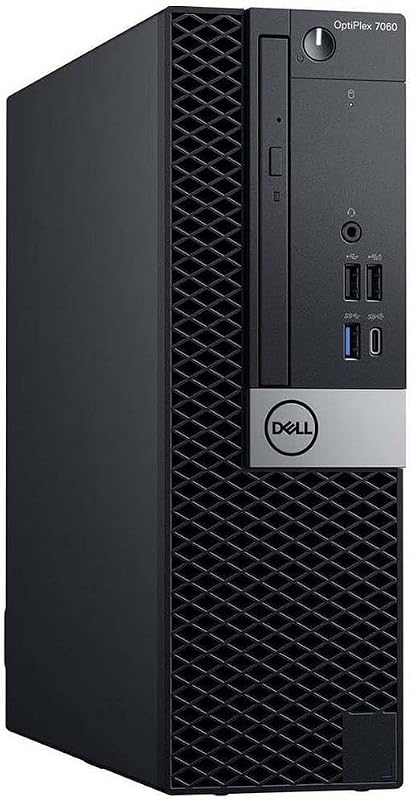
Best for: Six-core business productivity and wireless workflows
Pros
- Intel 8th Gen 6-core i7
- 32GB DDR4 memory
- Built-in WiFi and Bluetooth
Cons
- 512GB storage capacity
- DisplayPort only video outputs
Stepping up in processing capability, the DELL Optiplex 7060 SFF Desktop Computer features an 8th-generation Intel Core i7-8700 processor. With six physical cores reaching frequencies up to 4.60 GHz, this system delivers the multi-threaded speed needed for compiling data-heavy reports, background file synchronization, and running concurrent productivity suites. The hardware configuration includes 32GB of DDR4 RAM, ensuring seamless switching between software without memory bottlenecks.
Local data is stored on a 512GB M.2 NVMe solid-state drive, which supports rapid read and write rates for application launches. Dual-monitor workstations are supported via two rear DisplayPort outputs. The chassis provides five USB 3.0 ports and two USB 2.0 ports, alongside a DVD+RW optical drive. Unlike systems requiring external dongles, this model features built-in WiFi and Bluetooth, and ships with an included wireless keyboard and mouse to keep your desk clear of tangled wiring. The enclosure measures 18 by 14 by 6 inches and operates on an energy-conscious 65-watt power specification.
This machine suits home office and enterprise workers who need six-core processing responsiveness and integrated wireless peripherals right out of the box. Users who require extensive expansion card bays might evaluate full-height towers like a dell optiplex mt, but this small form factor chassis delivers ample everyday speed while conserving desktop area.
- Intel 8th Generation Core i7-8700 six-core processor reaching up to 4.60 GHz
- 32GB DDR4 memory combined with a fast 512GB M.2 NVMe solid-state drive
- Built-in WiFi and Bluetooth paired with an included wireless keyboard and mouse
- Dual DisplayPort video connections and five USB 3.0 ports
03 Dell OptiPlex 7070 SFF Desktop Computer

Best for: Demanding office workloads needing fast WiFi 6E
Pros
- Intel 8-core i7-9700 processor
- Internal AX210 WiFi 6E
- Roomy 1TB NVMe SSD
Cons
- Heavier 13-pound desktop weight
- DisplayPort only video connections
For users handling compute-heavy productivity workloads, the Dell OptiPlex 7070 SFF Desktop Computer presents an eight-core computing platform. Powered by an Intel 9th-generation Core i7-9700 processor running from 3.0 GHz up to 4.70 GHz, this workstation smoothly executes heavy calculations, data parsing, and multi-window multitasking. Its 32GB of DDR4 memory ensures zero interface lag during intensive project workflows.
The system is fitted with a 1TB M.2 NVMe solid-state drive operating over the PCIe x4 interface, providing extensive storage alongside rapid data transfer rates. Peripheral connectivity is comprehensive, featuring five USB 3.1 ports, four USB 2.0 ports, an internal microphone interface, and a DVD-RW optical drive. Dual DisplayPort connections accommodate two external productivity monitors. For networking, it incorporates an internal AX210 WiFi 6E adapter alongside Bluetooth, ensuring reliable wireless data transfer speeds when connected to modern office routers. An included wireless keyboard and mouse complete the workstation bundle.
This desktop is well matched to demanding professionals who need high core counts, modern wireless networking, and substantial internal storage. While users focusing purely on high-refresh 3D rendering might investigate dedicated dell optiplex gaming platforms, this configuration represents a top-tier choice for general business and creative office duties.
- Intel 9th Gen Core i7-9700 octa-core processor operating up to 4.70 GHz
- 32GB DDR4 RAM and a high-speed 1TB PCIe x4 M.2 NVMe solid-state drive
- Integrated AX210 WiFi 6E wireless connectivity and Bluetooth
- Five USB 3.1 ports, four USB 2.0 ports, and dual DisplayPort outputs
04 Dell Optiplex 5090 SFF Desktop

Best for: Modern 10th Gen processing on wired networks
Pros
- 10th Gen 6-core i5-10500
- Native HDMI and DisplayPort ports
- Compact 9.8-pound chassis
Cons
- No wireless card included
- No keyboard or mouse included
Featuring a newer processor architecture, the Dell Optiplex 5090 SFF Desktop is built around a 10th-generation Intel Core i5-10500 processor. The chip houses six physical cores running at a 3.1 GHz base frequency with Turbo Boost reaching up to 4.5 GHz. This modern architecture delivers responsive single-threaded and multi-threaded performance, making it well suited for modern office suites, collaborative software, and communication tools.
The machine includes 16GB of system memory alongside a 512GB solid-state drive, balancing responsive everyday multitasking with fast system boot times. Dual monitor setups are supported natively through an integrated graphics chip that outputs via one HDMI port and one DisplayPort socket, eliminating the need for specialized video adapters. Measuring 11.42 by 3.66 by 11.54 inches and weighing 9.8 pounds, this tower takes up minimal room on an office desk or equipment shelf. It also includes an integrated DVD-RW optical drive and standard audio connections.
The product listing specifies that there is no wireless card, keyboard, or mouse included with this renewed unit. As a result, this system is best suited for corporate or home offices with hardwired Ethernet drops where users prefer to connect their own dedicated ergonomic keyboard and mouse setup.
- Intel 10th Generation Core i5-10500 six-core processor with 4.5 GHz Turbo Boost
- 16GB of system RAM paired with a 512GB solid-state drive
- Native HDMI and DisplayPort outputs for simple dual-screen connectivity
- Compact 9.8-pound chassis with an integrated DVD-RW optical drive
05 Dell Optiplex 3050 SFF Desktop Computer
Best for: Everyday administrative paperwork and basic multi-display desks
Pros
- Dual 4K display support
- 16GB DDR4 memory
- Bundled keyboard and mouse
Cons
- Smaller 256GB solid-state drive
- Older 6th Gen quad-core processor
The Dell Optiplex 3050 SFF Desktop Computer is an efficient desktop designed for essential administrative responsibilities, billing tasks, and everyday paperwork. Running on an Intel Core i5-6500 quad-core processor clocking up to 3.6 GHz, it handles general web navigation, office productivity suites, and document drafting with steady stability. The chassis measures 11.2 by 3.75 by 11.5 inches, fitting easily on narrow desks or underneath a monitor riser.
The workstation includes 16GB of DDR4 memory and a 256GB solid-state drive, ensuring rapid boot times into Windows 11 Pro 64-bit. For display versatility, the rear panel supports 4K dual-display output across its DisplayPort and HDMI ports, while a legacy VGA connection offers backward compatibility for older displays. Connectivity options include four USB 3.0 ports, four USB 2.0 ports, an RJ-45 Ethernet jack, a universal audio port, and an internal DVD-RW optical drive. It comes bundled with a USB keyboard, a USB mouse, a USB WiFi adapter, and a 30-day free trial of Microsoft Office.
For organizations transitioning from older operating environments such as a dell refurbished desktop windows 7 pro setup, this renewed model offers an up-to-date Windows 11 Pro workspace for routine paperwork. It gives way to the 7000-series models when daily workflows demand heavier RAM capacity or faster multi-core performance.
- Intel Core i5-6500 quad-core processor reaching up to 3.6 GHz
- 16GB DDR4 memory and a responsive 256GB solid-state drive
- Support for 4K dual displays using HDMI and DisplayPort interfaces
- Supplied with USB keyboard, USB mouse, and USB WiFi wireless dongle
06 Dell Optiplex 3060 Desktop Computer
Best for: Home offices desiring high RAM and RGB styling
Pros
- Hexa-core Intel i5-8500
- 32GB RAM and 1TB SSD
- Customizable 13-mode RGB lighting
Cons
- Slightly larger chassis dimensions
- Partially met listing specification status
Bringing a creative design aesthetic to the business workstation category, the Dell Optiplex 3060 Desktop Computer integrates custom lighting alongside high-capacity hardware. Under the hood, an Intel Core i5-8500 hexa-core processor running at 3.2 GHz delivers six cores of computing power for multitasking, local data processing, and lightweight multimedia streaming. Dell matches this processor with 32GB of DDR4 RAM, allowing intensive productivity tools to run concurrently without memory throttling.
The unit features a large 1TB solid-state drive that accommodates extensive local file archives and provides rapid file transfer rates. A unique feature of this renewed unit is an integrated side panel RGB lighting kit that provides access to 13 distinct color options and lighting modes via a push button. Physical connectivity includes DisplayPort and HDMI outputs, multiple USB 2.0 and USB 3.0 ports, standard Gigabit Ethernet, and 3.5mm audio jacks. Networking is completed by an included Wi-Fi adapter along with built-in Bluetooth.
This desktop measures 13.8 by 10.8 by 6 inches and weighs 11.9 pounds. It is well suited for home professionals who want 32GB of RAM, six-core processing speed, and extensive storage, combined with a customizable visual flair that breaks away from traditional monochrome office towers.
- Intel Core i5-8500 hexa-core processor operating at 3.2 GHz
- 32GB DDR4 system memory paired with a 1TB solid-state drive
- Integrated side panel RGB lighting kit offering 13 selectable modes
- Dual video output via HDMI and DisplayPort with wireless connectivity
What Sets These Models Apart
| Model | Processor | System Memory | Storage Capacity | Primary Video Ports |
|---|---|---|---|---|
| Dell Optiplex 7050 SFF Desktop PC | Intel Core i7-7700 (4 Cores, 3.60 GHz) | 32GB DDR4 | 1TB SSD | HDMI, DisplayPort |
| DELL Optiplex 7060 SFF Desktop Computer | Intel Core i7-8700 (6 Cores, up to 4.60 GHz) | 32GB DDR4 | 512GB M.2 NVMe SSD | 2x DisplayPort |
| Dell OptiPlex 7070 SFF Desktop Computer | Intel Core i7-9700 (8 Cores, up to 4.70 GHz) | 32GB DDR4 | 1TB M.2 NVMe SSD | 2x DisplayPort |
| Dell Optiplex 5090 SFF Desktop | Intel Core i5-10500 (6 Cores, up to 4.5 GHz) | 16GB | 512GB SSD | HDMI, DisplayPort |
| Dell Optiplex 3050 SFF Desktop Computer | Intel Core i5-6500 (4 Cores, up to 3.6 GHz) | 16GB DDR4 | 256GB SSD | HDMI, DisplayPort, VGA |
| Dell Optiplex 3060 Desktop Computer | Intel Core i5-8500 (6 Cores, 3.2 GHz) | 32GB DDR4 | 1TB SSD | HDMI, DisplayPort |
Buying Tips for Dell Desktop Computers
When selecting a renewed desktop workstation, the first consideration should be matching processor core counts and memory capacity to your daily workflow. Quad-core options like the Core i5-6500 or Core i7-7700 provide dependable performance for standard document typing, basic data entry, and routine administrative duties. For users who regularly run multiple resource-intensive applications, heavy spreadsheet macros, or concurrent virtual meetings, stepping up to a six-core or eight-core model such as the OptiPlex 7060, 5090, or 7070 significantly reduces system throttling during peak operational periods.
Display connectivity is equally vital when setting up an ergonomic workstation. Small form factor OptiPlex towers commonly feature combinations of DisplayPort, HDMI, and occasional VGA outputs. If you plan to deploy a dual-screen productivity setup, ensure your chosen monitors accept the native outputs of the desktop or that you have compatible cables available. Models with dual DisplayPorts connect directly to commercial enterprise displays, while units with native HDMI ports easily link to standard consumer monitors without adapters.
Finally, examine the included accessories and networking hardware specified in each listing. While some renewed desktop packages include wireless adapters, built-in Bluetooth, and bundled input devices, other models are configured strictly for hardwired enterprise networks and do not include wireless cards or peripherals. Checking whether a machine includes built-in Wi-Fi or requires an external USB dongle helps you prepare your workspace and select the right peripheral accessories before setting up your workstation.
FAQ
Can renewed Dell OptiPlex desktops support dual-monitor setups?
Yes, all six reviewed models support multi-monitor configurations through their included video outputs. Units like the OptiPlex 7060 and 7070 provide dual DisplayPort sockets, while the OptiPlex 7050, 5090, 3050, and 3060 feature a combination of DisplayPort and HDMI ports. The OptiPlex 3050 also includes a legacy VGA port for connecting older desktop monitors.
What is the difference between OptiPlex 3000, 5000, and 7000 series models?
Dell categorizes its business desktops into tier structures. The 3000-series represents entry-level workstations built for standard office tasks and essential computing. The 5000-series offers mainstream commercial performance with updated processing architectures. The 7000-series stands as the premium tier, featuring higher maximum memory ceilings, additional USB ports, and higher-tier Core i7 processor configurations.
Do renewed Dell desktops come with pre-installed operating systems?
All six models evaluated in this guide include pre-installed 64-bit Windows 11 Pro operating systems. This business edition provides enterprise security tools, remote desktop capabilities, and advanced system management features suited for corporate domains and home office workstations.
What should you consider regarding WiFi connectivity on renewed OptiPlex machines?
Wireless capabilities differ across renewed listings. Some models, like the OptiPlex 7070, include advanced internal AX210 WiFi 6E cards, while others such as the OptiPlex 7060 feature integrated wireless radios. Certain models rely on bundled external USB WiFi adapters, and the OptiPlex 5090 listing explicitly states that no wireless card is included, requiring a hardwired Ethernet connection or an aftermarket wireless solution.
How does the small form factor chassis fit onto a standard office desk?
The small form factor chassis measures approximately 11 to 18 inches in its largest dimension and under 4 inches in thickness. This slim profile allows it to stand vertically beside a desk leg or lay horizontally flat on the desk surface, where it can double as a sturdy base beneath a monitor riser to maximize usable surface space.