As Amazon Associates, we earn from qualifying purchases. This means we may receive a small commission at no extra cost to you if you click through and make a purchase.
A unified desktop setup relies on peripherals that share consistent ergonomic geometry, reliable driver software, and tuned response times. Investing in a razer gaming bundle streamlines your desk arrangement by bringing your keyboard, mouse, and audio equipment under the synchronized control of Razer Synapse, preventing driver conflicts while matching aesthetic lighting across your workspace. For professionals and gamers managing daily routines that shift between intensive office productivity and fast-paced competitive gaming, selecting a matched peripheral kit delivers consistent tactile feedback and ergonomic stamina throughout long desk sessions.
This razer gaming bundle comparison examines exactly 6 Razer setups, ranging from three-in-one peripheral combinations with audio headsets and desk mats to focused high-polling esports pairings and ergonomic wired pointers. Each package addresses distinct desktop priorities, balancing cable management, physical desk dimensions, optical sensor performance, and programmable shortcuts to help you determine which razer gaming bundle to buy for your personal work and gaming environment.
Which Razer Gaming Bundles Should You Buy
- Competitive FPS and esports players: Choose the Razer PC Esports Gaming Bundle for rapid-trigger optical keys, an ultra-light 56g chassis, and 8000 Hz polling performance.
- Full-workspace starters: Choose the Razer Power Up Bundle for a complete keyboard, mouse, and headset combination out of a single package.
- Productivity and macro power users: Choose the Razer Basilisk V3 Customizable RGB Wired for 11 programmable buttons, thumb support, and dual-mode scroll wheel action.
- Cross-platform audio and voice users: Choose the Razer BlackShark V2 X Gaming Headset for lightweight passive sound isolation and universal 3.5mm connectivity.
- Minimalist ergonomic desks: Choose the Razer DeathAdder Essential Ergonomic Wired Gaming for durable mechanical switching and a proven palm-grip chassis.
- Complete tactical mouse and desk upgrades: Choose the Razer Battle Bundle for a matched high-DPI mouse, cloth tracking pad, and closed-back acoustic headset.
01 Razer PC Esports Gaming Bundle

Best for: Competitive esports and high-refresh desks
Pros
- True 8000 Hz polling rate
- Rapid Trigger optical actuation
- Ultra-lightweight 56g mouse build
Cons
- Reduced battery life at 8KHz
- No dedicated numeric keypad
The Razer PC Esports Gaming Bundle represents a top-tier peripheral package developed for competitive speed, tactical movement, and zero-compromise input latency. This setup pairs the ultra-lightweight 56-gram DeathAdder V4 Pro wireless mouse with the Huntsman V3 Pro Tenkeyless optical keyboard. Both devices are calibrated to operate within a unified Razer Synapse 4 profile, aligning mouse tracking with keyboard key resets so aim adjustments and directional strafes register instantaneously.
For desk ergonomics, the tenkeyless keyboard form factor frees up considerable desk space for wide mouse sweeps, making it a natural fit for tactical shooters like Counter-Strike 2 and Valorant. If you run your battlestation from an upgraded system like a dell optiplex gaming workstation, this bundle utilizes HyperSpeed Wireless Gen-2 to achieve true 8000 Hz polling with 37 percent lower latency than prior generations. The mouse houses a Focus Pro 45K Gen-2 optical sensor with 99.8 percent resolution accuracy and delivers up to 150 hours of battery life on standard 1000 Hz polling, while the keyboard includes Rapid Trigger and Razer Snap Tap for near-instant directional changes.
This razer deathadder and huntsman bundle suits competitive players and high-refresh desktop setups that demand cutting-edge input registration. However, users who require a dedicated numeric keypad for data entry or prefer an all-in-one kit with audio included may want to look toward broader desk packages.
- DeathAdder V4 Pro wireless mouse weighing 56 grams with Focus Pro 45K optical sensor Gen-2
- Huntsman V3 Pro TKL keyboard equipped with Rapid Trigger, adjustable actuation, and Razer Snap Tap
- HyperSpeed Wireless Gen-2 supporting up to 8000 Hz wireless mouse polling rates
- Unified control and rapid calibration through a single Razer Synapse 4 profile
02 Razer Power Up Bundle
Best for: Entry-level desktop setups needing complete gear
Pros
- Complete keyboard mouse and headset kit
- Spill-resistant durable keyboard design
- Ambidextrous optical mouse shape
Cons
- Single-zone backlighting only
- Requires multiple wired connections
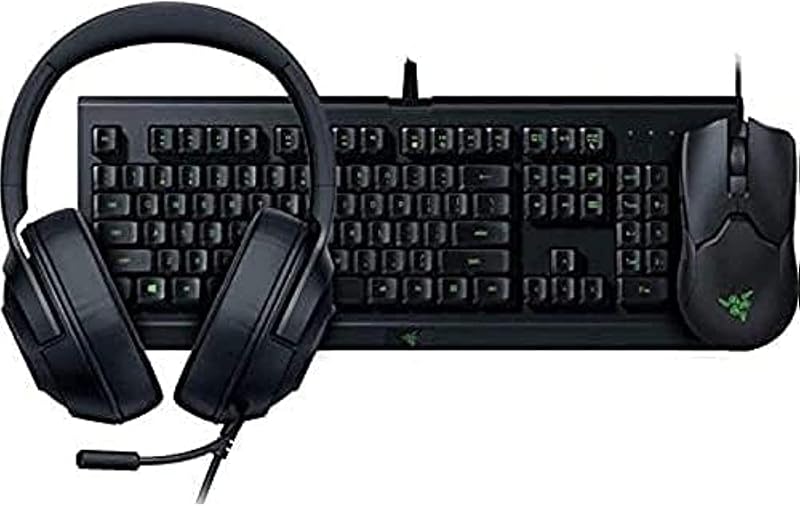
The Razer Power Up Bundle offers a comprehensive peripheral kit designed to equip an entire desk in one purchase. This razer gaming setup bundle contains three primary components: the Cynosa Lite keyboard, the Viper ambidextrous wired gaming mouse, and the Kraken X Lite gaming headset. Connecting directly via USB, the set provides immediate functionality across Windows and macOS systems without requiring disparate peripheral shopping.
The Cynosa Lite keyboard provides gaming-grade keys inside a durable, spill-resistant housing, safeguarding your workspace against accidental liquid damage during long work hours or gaming sessions. It supports single-zone Razer Chroma backlighting and integrates with Synapse 3 software. The accompanying Viper wired mouse utilizes an ultra-light ambidextrous shell, optical mouse switches, and an optical sensor boasting 99.4 percent resolution accuracy, giving left- and right-handed users fast, reliable tracking. The Kraken X Lite headset completes the package with an ultra-lightweight frame and cushioned earcups built for extended acoustic comfort during calls and gaming.
This package is ideal for students or remote workers outfitting a bare desk who need functional input and audio hardware right away. It yields to specialized setups like the esports pairing when wireless freedom or advanced mechanical rapid-trigger switches are needed.
- Cynosa Lite keyboard featuring spill-resistant construction and Razer Chroma single-zone lighting
- Viper wired mouse with lightweight ambidextrous layout and Razer Optical Mouse Switches
- Kraken X Lite headset offering lightweight over-ear comfort and clear team audio
- Universal plug-and-play USB connectivity for personal computers, laptops, and consoles
03 Razer Basilisk V3 Customizable RGB Wired

Best for: Productivity workflows and macro-heavy gameplay
Pros
- 11 fully programmable buttons
- Dual-mode HyperScroll tilt wheel
- Comfortable ergonomic thumb rest
Cons
- Wired cable drag
- Right-hand exclusive form factor
The Razer Basilisk V3 Customizable RGB Wired mouse delivers an advanced ergonomic command center for users who balance detailed professional tasks with gaming marathons. Designed with an iconic right-handed form factor, deep thumb rest, and textured finger grips, this mouse stabilizes hand posture and reduces wrist fatigue during long desk sessions. For setups powered by an amd ryzen 7 motherboard combo handling content creation and multitasking, its 11 programmable buttons allow instant macro execution for video editing, spreadsheet shortcuts, and in-game abilities.
A distinctive feature of the Basilisk V3 is its dual-mode HyperScroll tilt wheel, which allows users to switch between tactile notched scrolling for precise cycling and a free-spinning mode for rapid document review. The mouse is equipped with a Focus+ 26K DPI optical sensor offering flawless tracking with zero smoothing, alongside Gen-2 optical mouse switches that actuate in 0.2 milliseconds and are rated for up to 70 million clicks. Across its chassis, 11 customizable Razer Chroma RGB lighting zones integrate dynamically with over 150 Chroma-enabled games.
This standalone pointer suits power users who require substantial programmable control and ergonomic thumb support. Users who need an ambidextrous layout or a full peripheral set with matching keyboard and headset will find complete bundles more fitting.
- Iconic ergonomic right-handed chassis equipped with an integrated thumb rest
- HyperScroll tilt wheel featuring tactile notched and free-spinning scroll modes
- Focus+ 26,000 DPI optical sensor delivering pixel-precise tracking accuracy
- 11 programmable buttons and 11 independent Razer Chroma RGB lighting zones
04 Razer BlackShark V2 X Gaming Headset
Best for: All-day audio comfort across platforms
Pros
- Lightweight 240g ergonomic frame
- TriForce Titanium 50mm drivers
- Universal 3.5mm analog connection
Cons
- Surround sound Windows exclusive
- Non-detachable audio cable
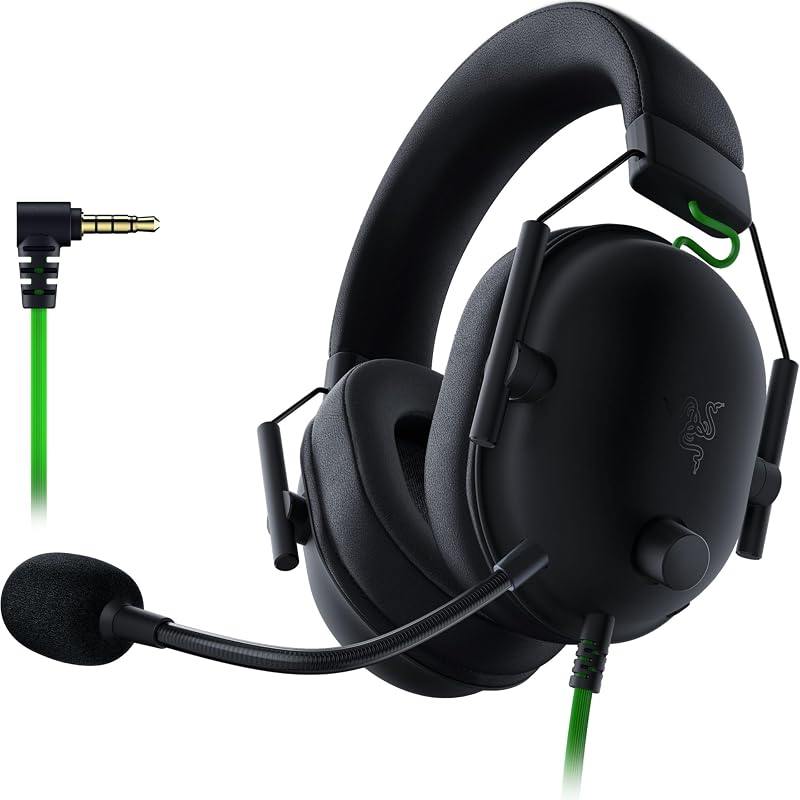
The Razer BlackShark V2 X Gaming Headset delivers clear acoustic isolation and vocal pickup for individuals who spend extensive hours in voice calls and competitive multiplayer matches. Built with an aviation-inspired closed-back earcup design, it provides advanced passive noise cancellation by sealing snugly around the ears to block ambient room distractions. At a lightweight 240 grams, the headset utilizes breathable memory foam cushions to minimize temple pressure and heat buildup during extended wear.
Audio clarity is driven by Razer TriForce Titanium 50mm drivers, which segment the diaphragm into three zones to tune treble, midrange, and bass independently, producing crisp dialogue and rich lows. Positional 7.1 surround sound is available on Windows 10 64-bit systems to enhance situational audio awareness. Communication is handled by a Razer HyperClear cardioid microphone with an optimized pickup pattern that isolates your voice while tapering off rear and lateral background noise. The universal 3.5mm jack ensures broad connectivity with PC, Mac, consoles, and mobile devices.
This headset is the perfect audio solution for shared rooms and noisy home offices where acoustic isolation and light clamping pressure matter most. Those seeking wireless freedom or integrated RGB backlighting will need to consider other peripheral models.
- TriForce Titanium 50mm sound drivers with individual tuning for highs, mids, and lows
- Ultra-light 240-gram design outfitted with breathable memory foam ear cushions
- Razer HyperClear cardioid microphone with noise-suppressing voice capture pattern
- Universal 3.5mm analog connectivity compatible with PC, Mac, and gaming consoles
05 Razer DeathAdder Essential Ergonomic Wired Gaming
Best for: Streamlined work desks wanting ergonomic comfort
Pros
- Classic ergonomic DeathAdder palm grip
- Durable 10M-click mechanical switches
- Tactile ridged rubberized scroll wheel
Cons
- Modest 6400 DPI sensor limit
- Only five programmable buttons
The Razer DeathAdder Essential Ergonomic Wired Gaming mouse brings the time-tested ergonomic curvature of the DeathAdder line to everyday work and gaming setups. Crafted specifically for right-handed palm and claw grip styles, its high-arch profile supports the natural resting posture of the hand, maintaining comfort throughout lengthy document processing or marathon gaming matches. Its straightforward wired USB architecture guarantees immediate responsiveness without wireless recharging cycles.
Under the hood, the mouse features a 6,400 DPI optical sensor that supports on-the-fly sensitivity toggling via dedicated buttons, allowing smooth transitions between detailed creative work and brisk desktop navigation. Its five programmable buttons can be remapped with complex macro functions inside Razer Synapse, while durable mechanical switches deliver up to 10 million crisp, tactile clicks. A ridged, rubberized scroll wheel with small tactile bumps provides positive traction for controlled scrolling in demanding situations.
This pointer suits users seeking an affordable, durable ergonomic mouse for general home office and casual gaming duties. Gamers who play fast tactical esports titles requiring sub-60-gram weights or high-polling optical sensors will prefer the DeathAdder V4 Pro inside the esports bundle.
- Classic DeathAdder ergonomic chassis engineered for right-handed comfort
- High-precision 6,400 DPI optical sensor with on-the-fly sensitivity adjustment
- Durable mechanical switches rated for up to 10 million actuations
- Five programmable buttons configurable via Razer Synapse software
06 Razer Battle Bundle
Best for: Complete mouse headset and pad desk upgrades
Pros
- Includes large Gigantus V2 mousepad
- 20000 DPI DeathAdder V2 mouse
- BlackShark V2 X acoustic headset
Cons
- Multiple wired desk cables
- Large pad requires ample desk room
The Razer Battle Bundle is a comprehensive three-piece hardware package assembled to upgrade input precision, tracking surface quality, and acoustic awareness in one coordinated package. Centered on competitive desk play, this kit combines the Razer DeathAdder V2 wired mouse, the BlackShark V2 X gaming headset, and the Gigantus V2 cloth gaming mousepad, solving desktop friction and audio communication needs together.
The DeathAdder V2 mouse represents a substantial technical upgrade over entry-level pointers, featuring a Focus+ 20,000 DPI optical sensor with 650 IPS tracking, 50G acceleration, and 99.6 percent resolution accuracy. It is equipped with optical mouse switches rated for 70 million clicks, tactile rubber side grips, and 0.8mm thick 100 percent PTFE feet for minimal surface resistance. When paired with the textured micro-weave cloth of the Gigantus V2 mousepad, mouse tracking remains fluid and uniform. The included BlackShark V2 X headset adds 50mm TriForce drivers and passive noise cancellation to complete the workstation overhaul.
This razer battle bundle is best suited for players seeking a complete tactical audio and pointing refresh without buying each accessory separately. However, desks with limited space may need to measure surface area first to comfortably accommodate the included full-sized mousepad.
- DeathAdder V2 mouse featuring 20,000 DPI Focus+ optical sensor and optical switches
- BlackShark V2 X headset providing 50mm drivers and passive noise attenuation
- Gigantus V2 cloth mousepad delivering low friction and consistent tracking
- Wired USB connection ensuring zero latency and continuous power delivery
What Sets These Models Apart
Evaluating these six Razer options reveals significant differences in product scope, sensor technology, and connectivity. While standalone mice and headsets provide targeted ergonomic or acoustic upgrades, complete packages address full workspace synergy out of the box.
| Product Name | Peripherals Included | Key Performance Metric | Connection Interface |
|---|---|---|---|
| Razer PC Esports Gaming Bundle | DeathAdder V4 Pro mouse, Huntsman V3 Pro TKL keyboard | 8000 Hz polling rate, 45K DPI sensor, Rapid Trigger | Wireless RF and USB |
| Razer Power Up Bundle | Cynosa Lite keyboard, Viper mouse, Kraken X Lite headset | Spill-resistant keys, 99.4% resolution accuracy | Wired USB |
| Razer Basilisk V3 Customizable RGB Wired | Basilisk V3 ergonomic gaming mouse | 26K DPI Focus+ sensor, HyperScroll tilt wheel | Wired USB |
| Razer BlackShark V2 X Gaming Headset | BlackShark V2 X over-ear headset | 50mm TriForce Titanium drivers, 240g weight | 3.5mm analog audio jack |
| Razer DeathAdder Essential Ergonomic Wired Gaming | DeathAdder Essential gaming mouse | 6,400 DPI optical sensor, 10M mechanical switches | Wired USB |
| Razer Battle Bundle | DeathAdder V2 mouse, BlackShark V2 X headset, Gigantus V2 pad | 20K DPI sensor, 70M optical switches, PTFE feet | Wired USB and 3.5mm |
Buying Tips for Razer Gaming Bundles
When selecting razer peripherals for desk setup integration, prioritize your primary computing use case and physical desktop dimensions. If your workspace frequently accommodates spreadsheets and web research alongside gaming, mice with ergonomic thumb rests and free-spinning scroll wheels, like the Basilisk V3, offer productivity advantages that standard gaming mice lack. Conversely, if your goal is minimizing desktop clutter while gaming on a mobile machine such as a thunderobot gaming laptop, a compact tenkeyless keyboard paired with a wireless mouse provides maximum physical space for arm movement.
Cable management and port availability also dictate the ideal setup. Comprehensive multi-device packages like the Power Up Bundle or Battle Bundle require multiple open USB and audio ports, which may necessitate a dedicated desktop hub. For users seeking a streamlined razer keyboard and mouse bundle, verifying whether devices utilize wireless RF dongles or standard wired connections ensures your daily docking routine remains clean and manageable.
Finally, consider long-term switch durability and software synchronization. Razer optical switches eliminate mechanical debounce delays and offer significantly higher click life ratings compared to traditional mechanical leaf switches. Checking that your selected devices communicate through Razer Synapse ensures unified macro configurations, lighting profiles, and firmware updates across every component on your desk.
FAQ
Can I manage all bundled Razer peripherals using a single software program?
Yes, Razer peripherals are designed to interface through Razer Synapse software. Devices like the Huntsman V3 Pro TKL and DeathAdder V4 Pro synchronize through Synapse 4, allowing you to configure lighting, adjust sensor DPI stages, record macros, and activate advanced features like Rapid Trigger and Snap Tap from one dashboard.
What advantage do optical mouse switches provide over mechanical switches?
Optical mouse switches use light beams to register clicks instead of physical metal contacts. This eliminates the need for debounce delay, provides actuation speeds as fast as 0.2 milliseconds, avoids unintended double-clicks, and extends lifespan up to 70 million actuations compared to standard 10-million-click mechanical switches.
Does the BlackShark V2 X headset require Razer Synapse to function?
No, the BlackShark V2 X connects using a standard 3.5mm analog audio jack, meaning it functions immediately with PC, Mac, consoles, and mobile devices without requiring software. However, activating software-enabled 7.1 surround sound requires a Windows 10 64-bit operating system and the included registration code.
What is the benefit of the Rapid Trigger feature found on the Huntsman V3 Pro keyboard?
Rapid Trigger resets key inputs the instant your finger begins lifting, rather than waiting for the key to cross a fixed physical reset point. This allows for near-instant repeated key presses and rapid counter-strafing in competitive games, giving players more immediate control over character movement.
Is the Razer Basilisk V3 suitable for left-handed users?
No, the Basilisk V3 features a dedicated right-handed ergonomic body with an integrated thumb rest and left-side thumb buttons. Left-handed users seeking a high-performance pointer should look for ambidextrous designs such as the Viper mouse included in the Power Up Bundle.