As Amazon Associates, we earn from qualifying purchases. This means we may receive a small commission at no extra cost to you if you click through and make a purchase.
Integrating external video sources into a modern desk setup requires hardware that bridges cameras, gaming consoles, and computers without introducing clutter or signal lag. Whether you are routing a mirrorless digital camera for executive conferencing or capturing gameplay from a handheld console, choosing the right capture device determines your stream stability and overall video quality. This guide breaks down the lineup to help you decide which ugreen video capture card to buy based on your daily workstation routine, desktop port availability, and display requirements.
Across the current catalog, we examine six distinct models that address varying production demands. While every unit shares UGREEN aluminum construction and broad platform compatibility across Windows, macOS, and Linux, they diverge significantly in data bus capabilities, video passthrough, and power routing. Some models function as straightforward plug-and-play USB dongles, others provide zero-latency HDMI loop-out ports for dedicated gaming monitors, and high-tier models integrate 100W Power Delivery passthrough to keep handheld consoles running during marathon recording sessions.
Which UGREEN Video Capture Card Should You Buy
- Travelers and hybrid workers who want smooth 60fps video capture in a compact dongle form factor should choose the UGREEN 2K@30Hz 1080P 60FPS Video Capture.
- Console gamers who need zero-latency passthrough to play on an external monitor while streaming will benefit most from the UGREEN 4K@30Hz Loop Out HDMI Capture.
- Educators and remote office workers seeking a simple, low-cost solution for webcams and meeting recording should opt for the UGREEN Full HD 1080P 30fps Video.
- Mobile creators streaming handheld systems like the Nintendo Switch or Steam Deck with simultaneous charging should select the UGREEN 2K 30FPS 1080P 60FPS USB.
- Handheld console streamers who demand both simultaneous fast charging and dual-screen HDMI monitoring need the UGREEN 2K@30Hz USB 3.0 Video Capture.
- Broadcast streamers who require dedicated hardware voiceover commentary mixing and zero-latency audio monitoring will prefer the UGREEN Full HD 2K 30Hz 1080P.
01 UGREEN 2K@30Hz 1080P 60FPS Video Capture

Best for: Mobile streamers needing high frame rate capture
Pros
- Fluid 1080p 60fps video capture
- Dual USB-A and USB-C connectors
- High-speed 5 Gbps USB 3.0 interface
- Durable lightweight aluminum alloy shell
Cons
- Lacks HDMI loop-out monitor passthrough
- No integrated device charging support
Designed for creators prioritizing clean motion capture without desktop bulk, the UGREEN 2K@30Hz 1080P 60FPS Video Capture features a high-speed 5 Gbps USB 3.0 interface. It accepts video inputs up to 4K at 30Hz and outputs either 2K at 30Hz or fluid 1080p at 60fps. This balance makes it an excellent match for camera setups where preserving original visual fidelity for post-production editing is essential, while still transmitting a clear, low-delay feed into broadcast software like OBS, Potplayer, or VLC.
In a daily workspace, this device excels through its integrated hybrid connector that supplies both USB-A and USB-C plugs on a single tethered lead. The internal wiring uses 26AWG and 30AWG tinned copper conductors, shielded by a durable aluminum alloy housing that sheds heat effectively and minimizes electromagnetic interference. Weighing just 50 grams, it slips effortlessly into a laptop sleeve, operating completely driver-free across Windows, macOS, Linux, and iPadOS 17 or later.
This model is ideal for vloggers, remote professionals, and content creators using digital cameras as high-end webcams. It also functions as a reliable ugreen capture card for Switch and modern consoles, provided HDCP is turned off on systems like the PS5. However, because it lacks a secondary video output, streamers who need to view their game on a separate lag-free television will want to look at loop-out capable alternatives instead.
- High-speed 5 Gbps USB 3.0 connection ensuring low-latency video streaming
- Versatile dual USB-A and USB-C hardware interface for wide host compatibility
- Accepts 4K at 30Hz video input while delivering 2K at 30Hz or 1080p at 60fps capture
- Durable aluminum casing with tinned copper internal conductors for heat dissipation
02 UGREEN 4K@30Hz Loop Out HDMI Capture
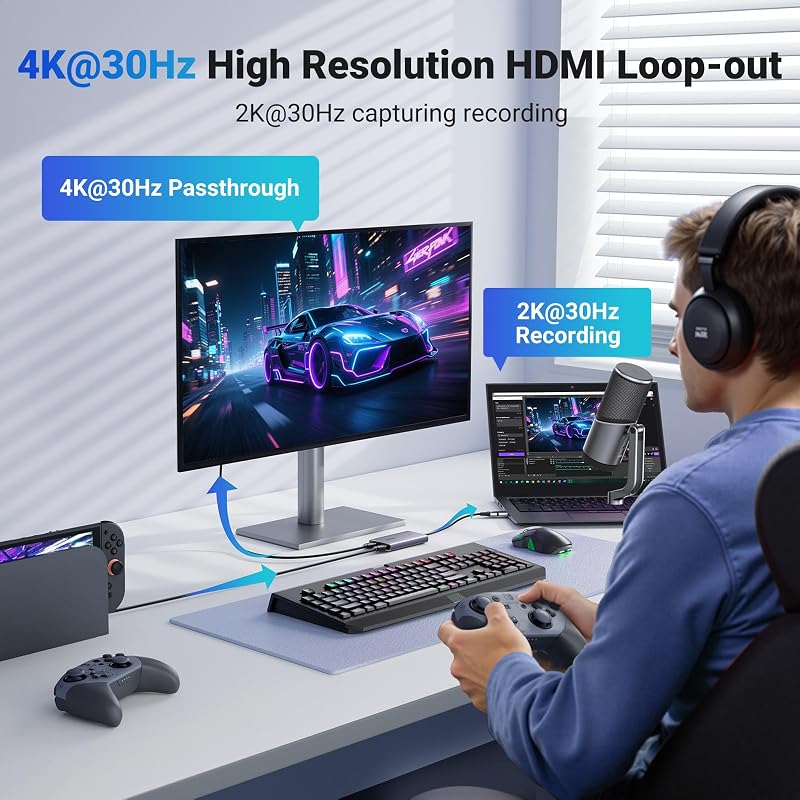
Best for: Console gamers playing on zero latency monitors
Pros
- 4K 30Hz zero-latency HDMI loop-out
- Uncompressed YUY2 video format support
- Sturdy aluminum chassis dissipates heat
- Plug and play driver-free operation
Cons
- Does not record in 4K resolution
- Requires driver installation on Windows 7
When competitive gameplay requires zero display delay, the UGREEN 4K@30Hz Loop Out HDMI Capture steps in as a dedicated dual-display solution. This unit handles 4K at 30Hz (4:4:4) input and mirrors that signal directly to a secondary display via its 4K at 30Hz local HDMI loop-out port. While your host computer captures video at up to 2K 30fps or 1080p 60fps over USB 3.0, your gameplay monitor displays the action in real time without passing through processing buffers.
The unit supports both MJPEG and YUY2 video formats, giving users the choice between lightweight compression and uncompressed pixel clarity. Its aluminum chassis weighs 88.2 grams, providing the thermal mass necessary to sustain stable performance during prolonged gaming or streaming sessions. The dual USB-A and USB-C output interface allows straightforward connection to desktop towers, laptops, or tablets without searching for port adapters.
This ugreen 4k loop out capture card is built specifically for console broadcasters playing on Xbox Series X, PlayStation 5, or Nintendo Switch who cannot tolerate the slight software preview latency found in streaming applications. While it solves the monitoring challenge cleanly, it does not supply external power to connected sources, meaning mobile and handheld console users must power their gaming devices independently.
- Integrated 4K at 30Hz HDMI loop-out port enabling zero-latency monitor preview
- Supports capture resolutions up to 2K at 30fps and 1080p at 60fps
- Dual YUY2 and MJPEG video format support for uncompressed clarity or compression efficiency
- Driver-free operation across Windows, macOS, Linux, and Android operating systems
03 UGREEN Full HD 1080P 30fps Video
Best for: Live commentary streamers requiring mic input
Pros
- 5mm microphone commentary port
- Headphone port for real-time monitoring
- 4K 60Hz input with 4K loop-out
- Engineered multi-stage thermal cooling
Cons
- Capture resolution capped at 2K 30Hz
- No power delivery passthrough charging

Best for: Basic webcams and virtual meeting setups
Pros
- Ultra-lightweight 19.9 gram body
- Accepts 4K 60Hz input sources
- Dual USB-A and USB-C compatibility
- Driverless setup across major systems
Cons
- Maximum capture limited to 1080p 30fps
- USB 2.0 bus limits data throughput
For essential conferencing, classroom presentations, and basic content collection, the UGREEN Full HD 1080P 30fps Video delivers a minimalist capture workflow. Utilizing a standard USB 2.0 architecture with transmission speeds up to 480Mbps, this compact dongle accepts input resolutions up to 4K at 60Hz with YCbCr 4:2:0 color sampling, cleanly downscaling the signal to a reliable 1080p output at 30fps.
Weighing an ultra-light 19.9 grams, this pocket-sized capture device is constructed with an aluminum alloy shell that balances everyday durability with rapid heat transfer. The smart internal processing chip maintains an uninterrupted signal stream, preventing frame freezing during critical meetings or lecture recordings. Its dual USB-A and USB-C connector enables instant pairing with contemporary laptops, iPads running iPadOS 17, and Android smartphones without requiring external power adapters or manual driver installations.
This model is the ideal choice for business professionals and educators who simply need to ingest a mirrorless camera or camcorder feed into Zoom or Teams. Users processing substantial camera footage alongside their live setups often pair this unit with a ugreen card reader to manage their offline assets efficiently. However, because it operates over USB 2.0 and maxes out at 30fps, it yields to USB 3.0 options whenever fast-paced 60fps action gaming is involved.
- Compact 19.9 gram aluminum-alloy housing designed for maximum desk portability
- Accepts 4K at 60Hz input signals and outputs clean 1080p video at 30fps
- USB 2.0 data connection providing 480Mbps throughput without external power
- Dual-interface USB-A and USB-C connection suitable for modern computers and tablets
04 UGREEN 2K 30FPS 1080P 60FPS USB

Best for: Handheld gamers streaming Switch or Steam Deck
Pros
- 100W PD fast charge passthrough
- Flexible 3.3-foot braided silicone cable
- Fast 5 Gbps low-latency transfer
- Crisp 2K 30fps and 1080p 60fps capture
Cons
- No dedicated HDMI loop-out port
- Unidirectional charging does not power host PC
Handheld gaming consoles introduce unique workspace challenges, primarily surrounding battery drain during high-load streaming. The UGREEN 2K 30FPS 1080P 60FPS USB solves this problem by integrating a dedicated USB-C Power Delivery port supporting 100W PD 3.0 fast charging. This setup allows streamers to deliver full operating wattage to a connected Nintendo Switch, Steam Deck, or ROG Ally while simultaneously piping audio and video directly to a host PC or tablet.
The hardware architecture leverages a 5 Gbps USB 3.0 pipeline, supporting input resolutions up to 4K at 30Hz while outputting video at 2K at 30Hz or 1080p at 60fps without screen tearing. An integrated 3.3-foot silicone braided cable provides generous flexibility on the desktop, relieving physical strain on your handheld console’s top or bottom ports. The aluminum shell and nickel-plated connectors ensure robust electrical contact and long-term durability in active workstations.
Creators maintaining extensive local gameplay archives can direct their recorded files to an external ugreen m.2 nvme ssd enclosure to handle high-bitrate video captures without filling their primary system drives. While this ugreen 100w pd capture card is exceptional for single-screen handheld streaming, it does not include an external HDMI loop-out port, meaning you must rely on your recording computer’s screen for visual feedback.
- Dedicated 100W Power Delivery 3.0 passthrough charging for handheld consoles
- Fast 5 Gbps data transmission preventing frame drops and tearing during capture
- Durable 3.3-foot flexible silicone braided cable with nickel-plated connectors
- Delivers up to 2K at 30Hz or 1080p at 60fps capture output from 4K 30Hz sources
05 UGREEN 2K@30Hz USB 3.0 Video Capture
Best for: Dual-display handheld console streaming workstations
Pros
- Simultaneous 100W PD and 4K loop-out
- Supports uncompressed YUY2 video
- Solid 6-ounce aluminum desk stability
- Compatible with Switch and Steam Deck
Cons
- Bulkier chassis than basic dongles
- Cannot charge the receiving laptop
For creators seeking the absolute combination of uninterrupted console power and professional display routing, the UGREEN 2K@30Hz USB 3.0 Video Capture brings together 100W PD charging and dedicated HDMI loop-out. Engineered around an HDMI 1.4 pipeline, it receives 4K at 30Hz video from consoles or cameras and delivers uncompressed YUY2 video up to 2K at 30fps or 1080p at 60fps to your host system via USB 3.0.
The standout advantage of this unit is its dual-purpose routing: you can pipe a 4K at 30Hz passthrough signal straight to your desktop gaming monitor while the integrated PD 3.0 port pumps up to 100W of power into your Steam Deck or Nintendo Switch. The solid aluminum alloy enclosure weighs 6 ounces, providing an anchor on your workspace that resists sliding when cables are attached. Tinned copper wiring within the cable harness further protects against electromagnetic signal degradation.
This ugreen hdmi capture card represents the premier choice for serious handheld console broadcasters who maintain a permanent dual-monitor desk layout. It eliminates the need for separate docking hubs, power injectors, and capture dongles by consolidating all three functions. Keep in mind that its fast charging is strictly unidirectional, engineered to charge the video source device rather than the host capture laptop.
- Simultaneous 100W Power Delivery fast charging and 4K at 30Hz HDMI loop-out
- Uncompressed YUY2 format support for superior color reproduction and clarity
- Solid 6-ounce aluminum build offering exceptional stability and heat management
- Captures smooth 1080p at 60fps or 2K at 30fps over a fast USB 3.0 host interface
06 UGREEN Full HD 2K 30Hz 1080P
Broadcasters who incorporate live voice commentary into their video productions will find a specialized solution in the UGREEN Full HD 2K 30Hz 1080P. Beyond standard video ingest, this model incorporates dedicated 3.5mm audio connectivity, featuring a microphone input supporting 48kHz 16-bit audio capture alongside a headphone jack. This configuration allows you to inject studio voice commentary directly into the hardware stream while monitoring master audio in real time without software lag.
Video processing capabilities are equally robust, supporting 4K at 60Hz (4:2:0) video input and 4K at 30Hz (4:4:4) HDMI passthrough to an external gaming screen. Host capture over the 5 Gbps USB 3.0 bus reaches 2K at 30Hz or 1080p at 60fps, ensuring fluid movement across modern titles. To maintain reliability when processing high-bandwidth video and audio simultaneously, the device integrates multi-stage internal cooling mechanisms to ensure steady thermal dissipation.
Content producers running extensive multi-camera or commentary archives can route their completed sessions directly into centralized storage like ugreen nas devices to preserve local drive capacity. This capture card is uniquely suited for solo commentators, tutorial creators, and esports streamers who want hardware-level audio mixing. It gives way to the PD 100W variants only if powering a handheld console directly through the capture link is your main priority.
- Dedicated 3.5mm microphone input supporting 48kHz 16-bit studio voice commentary
- Built-in headphone output port for zero-latency real-time audio monitoring
- Supports 4K at 60Hz input with 4K at 30Hz HDMI passthrough for external displays
- Engineered multi-stage cooling mechanisms for sustained high-bandwidth performance
What Sets These Models Apart
A detailed ugreen video capture card comparison highlights how specific hardware interfaces dictate desktop utility. While all models can ingest 4K input signals, their transfer buses, output resolutions, and specialized secondary ports determine how cleanly they integrate into your daily workflow. The table below compares the foundational specifications across the entire six-model lineup.
| Model | Max Capture Resolution | Passthrough / Loop-Out | Power Delivery | Special Ports / Audio |
|---|---|---|---|---|
| UGREEN 2K@30Hz 1080P 60FPS Video Capture | 2K@30Hz / 1080p@60fps | None | None (Bus Powered) | Dual USB-A / USB-C Interface |
| UGREEN 4K@30Hz Loop Out HDMI Capture | 2K@30fps / 1080p@60fps | 4K@30Hz HDMI | None (Bus Powered) | YUY2 / MJPEG Formats |
| UGREEN Full HD 1080P 30fps Video | 1080p@30fps | None | None (Bus Powered) | USB 2.0 Ultra-Light Build |
| UGREEN 2K 30FPS 1080P 60FPS USB | 2K@30Hz / 1080p@60fps | None | 100W PD 3.0 Fast Charge | 3.3FT Silicone Braided Cable |
| UGREEN 2K@30Hz USB 3.0 Video Capture | 2K@30Hz / 1080p@60fps | 4K@30Hz HDMI | 100W PD Fast Charge | YUY2 Uncompressed Output |
| UGREEN Full HD 2K 30Hz 1080P | 2K@30Hz / 1080p@60fps | 4K@30Hz HDMI | None (Bus Powered) | 3.5mm Mic-In & Headphone Ports |
Buying Tips for UGREEN Video Capture Cards
Understanding the bandwidth difference between USB 2.0 and USB 3.0 is critical when selecting a capture device. A standard USB 2.0 card tops out at 480Mbps, which restricts video output to 1080p at 30fps and relies on heavier internal compression to keep the signal stable. In contrast, USB 3.0 cards deliver 5 Gbps transfer speeds, granting enough data overhead to handle uncompressed YUY2 formats and silky 1080p 60fps streams. If you plan to stream fast-paced action gaming or want smooth camera panning, prioritizing a USB 3.0 interface is essential.
Another pivotal consideration is whether your setup demands local HDMI loop-out. When using a basic capture dongle without passthrough, the only way to view your video source is through the preview window inside software like OBS Studio or QuickTime. While USB 3.0 minimizes transmission delay, there remains a slight fraction of visual lag that can disrupt high-reflex console gaming. A card equipped with 4K HDMI loop-out splits the raw video signal directly to your gaming screen with genuine zero latency, completely isolating your viewing experience from computer processing loads.
Finally, evaluate the power requirements of your source devices, particularly if you broadcast from portable gaming handhelds or mobile tablets. Streaming video while rendering graphics heavily strains internal batteries, quickly exhausting devices like the Nintendo Switch or Steam Deck. Investing in a ugreen usb c video capture card equipped with 100W Power Delivery passthrough allows you to route full charging wattage directly through the capture hardware, keeping your workspace streamlined and eliminating battery anxiety without requiring separate multi-port docks.
FAQ
Can UGREEN video capture cards record in native 4K resolution?
While several models accept 4K input signals at 30Hz or 60Hz, and select units support 4K HDMI loop-out passthrough to an external monitor, none of these capture devices record in native 4K. The maximum capture resolution output to your host computer is 2K at 30Hz or 1080p at 60fps, which provides an optimal balance between visual clarity, system resource utilization, and broadcast stability.
Do I need to install manual software drivers to use these capture cards?
All modern UGREEN video capture devices feature driver-free plug-and-play installation across contemporary operating systems, including Windows 11, Windows 10, macOS, Linux, and Android. They adhere to standard USB Video Class protocols, allowing applications like OBS, Zoom, and Teams to recognize them instantly. If you are operating on legacy Windows 7 systems, manual driver installation is noted on specific product listings.
How does the 100W Power Delivery feature work on compatible models?
On models featuring 100W PD, a dedicated USB-C power input port accepts power from your device’s original wall charger or compatible PD adapter. The capture card routes up to 100W directly into connected portable sources, such as a Nintendo Switch, Steam Deck, or iPad. Note that this charging path is strictly unidirectional and is engineered to charge the gaming source device rather than the host computer receiving the video feed.
Can I use a UGREEN HDMI capture card with a Nintendo Switch?
Yes, all UGREEN capture cards support video streaming from the Nintendo Switch. Standard HDMI models connect directly to the HDMI port on the official Switch dock, while specialized USB-C capture models can interface directly with USB-C handhelds to provide power and video capture over a single connection line.
What is the functional difference between MJPEG and YUY2 video formats?
MJPEG compresses individual video frames into JPEG images, reducing required USB bandwidth and allowing high frame rates over constrained connections at the expense of slight compression artifacts. YUY2 is an uncompressed video format that preserves pristine color accuracy and fine edge details, making it the preferred format for color grading and professional streaming when connected via high-bandwidth USB 3.0 ports.