As Amazon Associates, we earn from qualifying purchases. This means we may receive a small commission at no extra cost to you if you click through and make a purchase.
Investing in a benq 27 inch monitor 5k setup brings transformative clarity to daily desk workflows. A 5K panel delivers native pixel-doubled rendering on modern desktop systems, providing crisp text, razor-sharp graphics, and expansive canvas space without display scaling blur. For visual creators and professionals spending full workdays at a desk, panel resolution directly influences eye comfort and productivity. Choosing between 5K clarity and capable 4K or 1080p displays depends on your hardware, color accuracy needs, and daily tasks.
This benq 27 monitor comparison reviews five 27-inch displays from the brand to help you select the right model. These five options differ across resolution tiers, color coverage, surface finishes, and connectivity protocols. The lineup ranges from a 5120×2880 creative station with Thunderbolt 4 to laptop-tuned 4K screens, a factory-calibrated production monitor, and an eye-care 1080p display with a 100Hz refresh rate. Analyzing how each screen handles daily computing will clarify which benq 27 monitor to buy.
Which BenQ Monitors Should You Buy
- Choose the BenQ PD2730S 27 5K if you are a VFX animator or 3D designer needing 218 PPI clarity, Thunderbolt 4 daisy chaining, and KVM switching.
- Choose the BenQ MA270U 27 4K if you dock a MacBook and want native keyboard brightness controls with a matte anti-glare panel.
- Choose the BenQ PD2706U 27 4K if you require factory-calibrated color accuracy across sRGB and P3 spaces with versatile USB-C connectivity.
- Choose the BenQ MA270UP 27 4K if you prefer a glossy screen finish with heightened contrast alongside seamless Mac volume and brightness integration.
- Choose the BenQ GW2790T 27 if your daily work involves spreadsheets and administrative tasks that benefit from a 100Hz refresh rate and ambient light sensors.
01 BenQ PD2730S 27″ 5K 218 PPI

Best for: VFX artists and creative professionals
Pros
- 5K resolution with 218 PPI density
- 90W Thunderbolt 4 daisy chaining
- 2000:1 contrast with Nano Matte panel
- Built-in KVM switch with Hotkey Puck
Cons
- 60Hz refresh rate ceiling
The BenQ PD2730S 27″ 5K 218 PPI serves as the high-density creative flagship in the lineup, featuring a 5120×2880 resolution across a 27-inch panel. This delivers 218 pixels per inch and 77.8 percent more workspace than standard 4K screens, rendering fine lines and text without visible pixelation. As a specialized benq 5k mac monitor, it includes Thunderbolt 4 connectivity that transfers data at 40Gbps and supplies up to 90W of power. With certified Thunderbolt 4 cables, it supports daisy chaining two 5K displays or connecting an 8K screen.
Color precision on the BenQ PD2730S 27 5K suits visual effects artists and 3D animators through 98 percent Display P3 coverage and a 2000:1 contrast ratio. Its Nano Matte panel features TÜV-certified reflection-free technology, diffusing room reflections during extended sessions. The built-in KVM switch and wireless Hotkey Puck allow seamless control of two systems with one keyboard and mouse. While it offers unmatched precision for digital media creation, general office workers will find its pixel density more than necessary, making standard 4K or 1080p models a more practical choice.
- Native 5120×2880 resolution delivering 218 PPI density and 77.8 percent more workspace than 4K screens
- Thunderbolt 4 port with 90W charging, 40Gbps transfers, and dual 5K daisy chain support
- Nano Matte reflection-free surface with a 2000:1 contrast ratio and 98 percent P3 color coverage
- Integrated KVM switch paired with a wireless Hotkey Puck for dual-system peripheral control
02 BenQ MA270U 27” 4K 3840×2160 Monitor
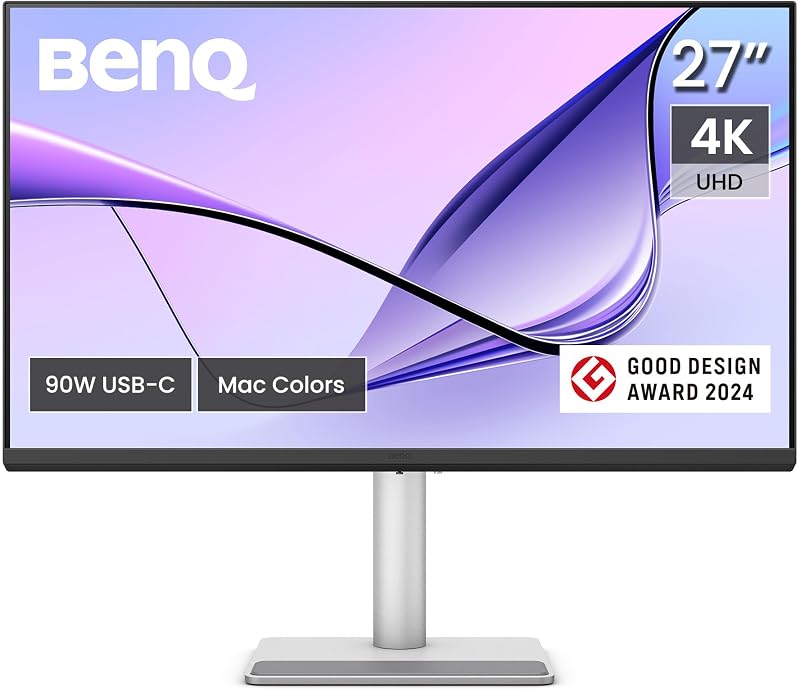
Best for: MacBook users needing matte desktop integration
Pros
- Direct MacBook keyboard brightness controls
- Dual USB-C with 90W and 15W charging
- 400 nits brightness and 2000:1 contrast
- Full ergonomic height, swivel, and pivot stand
Cons
- Lacks Thunderbolt daisy chain support
The BenQ MA270U 27” 4K 3840×2160 Monitor is tailored for laptop users wanting an external display that integrates directly with MacBook hardware. Featuring BenQ’s Mac color tuning technology, it matches the P3 wide color gamut of MacBook Pro and Air displays out of the box. A primary functional highlight is keyboard synchronization, enabling you to adjust monitor brightness and volume directly from your MacBook keyboard without using physical buttons.
The BenQ MA270U 27 4K features dual USB-C ports alongside two HDMI inputs. The main USB-C port supplies 90W of power to keep your laptop charged, while the secondary USB-C port outputs 15W to charge an iPhone or iPad at your desk. The matte IPS panel provides 400 nits of brightness and a 2000:1 contrast ratio. Its stand supports height, tilt, swivel, and pivot adjustments. Users needing KVM switching or color certification tools will find those on the PD series. Reading a ben q monitor 27 inch review helps confirm whether this laptop-focused design suits your daily routine.
- Mac-tuned P3 color gamut with native MacBook keyboard controls for brightness and volume
- Dual USB-C connectivity supplying 90W host charging and 15W device charging
- IPS panel offering 400 nits brightness, 2000:1 contrast ratio, and a glare-reducing matte finish
- Full ergonomic stand supporting height adjustment, tilt, swivel, and pivot rotation
03 BenQ PD2706U Mac-Ready Monitor 27” 4K
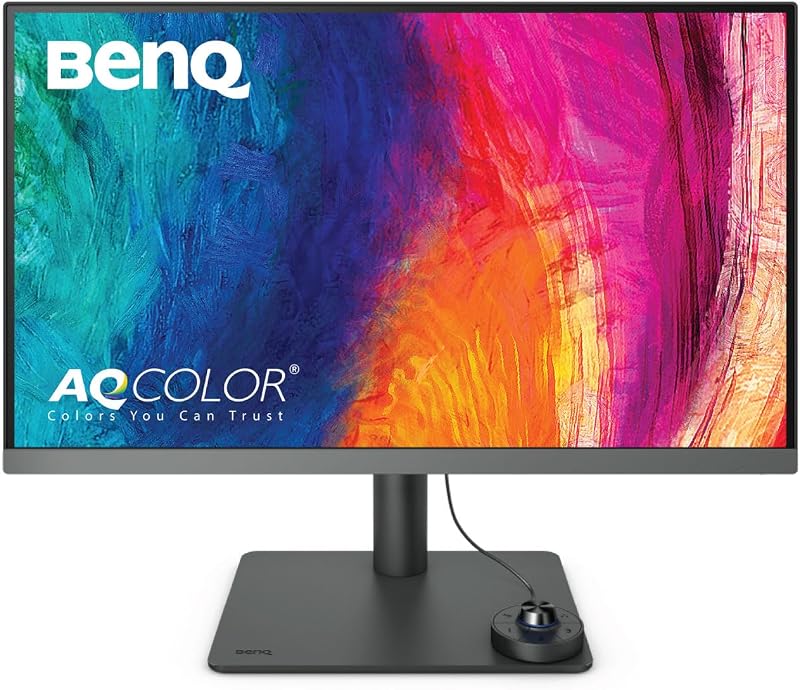
Best for: Designers requiring verified color calibration
Pros
- AQCOLOR factory calibration with Delta E under 3
- Pantone and Calman color certifications
- 90W USB-C and integrated KVM switch
Cons
- 250 nits typical luminance
The BenQ PD2706U Mac-Ready Monitor 27” 4K is built for creative professionals requiring verified color accuracy. Featuring AQCOLOR technology, this 3840×2160 IPS panel covers 95 percent of P3 and 99 percent of sRGB and Rec.709 color spaces. It arrives factory-calibrated with a Delta E of 3 or less and holds Calman Verified and Pantone Validated certifications. The BenQ Display Pilot software supports ICCsync, aligning color profiles in under a second.
Workstation versatility on the BenQ PD2706U 27 4K is anchored by an integrated KVM switch, letting one mouse and keyboard control two connected computers. The 90W USB-C connection transfers video, data, and power over a single cable, complemented by DisplayPort and HDMI ports. The physical Hotkey Puck enables rapid color mode and input switching. The panel provides 250 nits of brightness and a 1000:1 contrast ratio with DisplayHDR 400. While its calibration is outstanding, users wanting higher native contrast or Mac keyboard controls will prefer the MA series or 5K display.
- AQCOLOR calibration covering 95 percent P3, 99 percent sRGB, and Delta E of 3 or less
- 90W USB-C port supporting video, peripheral data, and laptop charging over one cord
- Built-in KVM switch and physical Hotkey Puck for convenient dual-computer management
- Eye-Care technology with anti-glare coating, low blue light, and flicker-free backlighting
04 BenQ MA270UP 27” 4K 3840×2160 Monitor

Best for: MacBook creators preferring glossy screen clarity
Pros
- Glossy finish with enhanced visual punch
- MacBook keyboard volume and brightness sync
- Dual USB-C ports with 90W power delivery
Cons
- Panel reflects ambient studio lighting
The BenQ MA270UP 27” 4K 3840×2160 Monitor combines Mac hardware integration with a glossy screen finish for users who prefer the clarity of glass panels. Unlike matte panels that scatter reflections, the glossy surface on the BenQ MA270UP 27 4K preserves crisp pixel edges, resulting in richer perceived contrast and color depth. With 400 nits of brightness, a 2000:1 contrast ratio, and wide viewing angles on an IPS panel, visual content appears vibrant and sharp.
This monitor includes native MacBook keyboard integration for screen brightness and audio volume. Port selection features dual HDMI inputs and dual USB-C ports delivering 90W laptop charging and 15W mobile device power. The ergonomic stand provides height, tilt, swivel, and pivot adjustment. Because the glossy surface reflects direct light, it works best in controlled lighting environments and gives way to matte screens in sunlit rooms. Evaluating a benq 24 inch monitor guide provides useful context on how display dimensions fit varying desk depths.
- Glossy display finish providing enhanced perceived contrast and color vibrancy
- Mac color tuning with native MacBook keyboard controls for volume and brightness
- Dual USB-C connectivity with 90W laptop power delivery and 15W mobile device charging
- 400 nits brightness, 2000:1 contrast ratio, and wide 178-degree viewing angles
05 BenQ GW2790T Computer Monitor 27″ 100Hz
Best for: Office workers seeking fluid daily scrolling
Pros
- Responsive 100Hz refresh rate
- Brightness Intelligence ambient light sensor
- Fully adjustable height and tilt stand
Cons
- 1080p resolution limits workspace detail
The BenQ GW2790T Computer Monitor 27″ 100Hz focuses on daily office productivity and learning environments. Rather than targeting ultra-high pixel density, this 27-inch 1920×1080 Full HD IPS monitor features a 100Hz refresh rate. This faster refresh rate creates smoother cursor movement, fluid document scrolling, and reduced eye strain during extensive reading compared to standard 60Hz office displays.
Ergonomics and eye comfort are central to the BenQ GW2790T 27, which features Brightness Intelligence Technology to dynamically adjust panel luminance based on ambient light. It includes Low Blue Light settings, flicker-free backlighting, and an anti-glare matte finish. The stand provides height and tilt adjustment, while built-in speakers, HDMI, and DisplayPort simplify desktop connections. Because it uses 1080p resolution and lacks USB-C charging, creative professionals needing fine detail will prefer the 4K or 5K alternatives. Exploring a benq gaming monitor 32 inch overview offers additional perspective on larger screen formats.
- Smooth 100Hz refresh rate delivering responsive scrolling and fluid cursor tracking
- Brightness Intelligence sensor automatically optimizing screen luminance to match room light
- Full HD 1080p IPS panel with 99 percent color gamut coverage and wide viewing angles
- Ergonomic mount offering height and tilt adjustment along with integrated speakers
What Sets These Models Apart
Comparing these five displays reveals clear differences in resolution, connectivity, and screen finishes. When evaluating benq 27 inch 4k vs 5k options, pixel density is the defining factor. A 27-inch 4K panel provides 3840×2160 pixels at roughly 163 PPI, requiring interface scaling that can soften tiny UI elements. In contrast, the 5120×2880 resolution on the PD2730S delivers 218 PPI, matching native pixel-doubled rendering. This yields 77.8 percent more workspace than 4K screens while keeping typography and graphic assets razor-sharp.
Workstation connectivity also sets these models apart. The PD2730S provides Thunderbolt 4 with 40Gbps bandwidth, supporting dual 5K daisy chaining and KVM switching via a wireless Hotkey Puck. The MA270U and MA270UP prioritize single-cable laptop convenience with dual USB-C ports delivering 90W and 15W charging, alongside direct Mac keyboard controls. The PD2706U combines factory-verified AQCOLOR calibration with 90W USB-C and KVM routing, while the GW2790T focuses on high-refresh 100Hz office navigation via DisplayPort and HDMI.
| Model | Resolution | Contrast Ratio | Panel Finish | Key Connectivity |
|---|---|---|---|---|
| BenQ PD2730S 27″ 5K 218 PPI | 5K 5120×2880 | 2000:1 | Nano Matte | Thunderbolt 4 (90W), KVM Switch |
| BenQ MA270U 27” 4K 3840×2160 Monitor | 4K UHD 3840×2160 | 2000:1 | Matte | Dual USB-C (90W + 15W), 2x HDMI |
| BenQ PD2706U Mac-Ready Monitor 27” 4K | 4K UHD 3840×2160 | 1000:1 | Matte | USB-C (90W), DisplayPort, HDMI, KVM |
| BenQ MA270UP 27” 4K 3840×2160 Monitor | 4K UHD 3840×2160 | 2000:1 | Glossy | Dual USB-C (90W + 15W), 2x HDMI |
| BenQ GW2790T Computer Monitor 27″ 100Hz | FHD 1920×1080 | 1000:1 | Matte | HDMI, DisplayPort, Built-in Speakers |
Buying Tips for BenQ Monitors
When deciding which benq 27 monitor to buy, consider your computer setup and primary software applications. If you use a modern laptop as your main computer, choosing a monitor with 90W USB-C or Thunderbolt 4 power delivery eliminates dedicated power bricks and routes display, data, and power through one cord. Laptop users also benefit from specialized color tuning and native keyboard control options that match laptop hardware.
Room lighting should guide your selection between matte and glossy panel finishes. A matte or Nano Matte surface diffuses ambient lighting, preventing distracting reflections in rooms with bright windows or overhead fluorescent fixtures. Conversely, a glossy screen provides deeper perceived contrast and richer saturation in workspaces where ambient lighting can be controlled.
Finally, align pixel density and refresh rate with your daily tasks. Creative professionals working in video, 3D modeling, and photography gain immense value from 4K and 5K resolutions where fine details and canvas space are paramount. For administrative tasks, email, and document processing, a 100Hz refresh rate provides smooth scrolling and reduced visual fatigue over long workdays.
FAQ
Is a 5K monitor visibly sharper than a 4K monitor at 27 inches?
Yes, the difference is noticeable during detailed visual work. A 27-inch 4K screen provides 163 pixels per inch, whereas a 5K screen offers 218 pixels per inch with 77.8 percent more pixels overall. This density enables native pixel doubling on desktop operating systems, producing sharper typography, smoother vector lines, and more workspace without scaling artifacts.
Can you control monitor volume and brightness from a MacBook keyboard?
Yes, on specific models such as the BenQ MA270U and BenQ MA270UP. These monitors feature built-in Mac control integration, allowing you to adjust screen brightness and audio volume directly using your laptop keyboard function keys without pressing physical buttons on the monitor frame.
What is the advantage of Thunderbolt 4 over standard USB-C on a monitor?
Thunderbolt 4 delivers 40Gbps of bidirectional bandwidth, supporting high-resolution video streams, 90W power delivery, and fast peripheral data through one connection. It also supports daisy chaining multiple high-resolution displays, enabling you to run two 5K screens from a single computer port using certified cables.
When is a glossy screen preferable to a matte screen?
A glossy screen, found on the BenQ MA270UP, maximizes optical clarity and perceived contrast, making colors appear more vibrant and blacks deeper. It is best suited for environments with controlled lighting. Matte and Nano Matte panels diffuse ambient reflections, making them better suited for bright rooms with direct sunlight or overhead lighting.
Why choose a 100Hz 1080p monitor instead of a 60Hz 4K monitor?
A 100Hz refresh rate updates the display 100 times per second, creating smoother cursor movement, fluid document scrolling, and reduced motion blur. For administrative workflows involving spreadsheets, text editing, and web research, the higher refresh rate can provide greater optical comfort than high-density resolution.