As Amazon Associates, we earn from qualifying purchases. This means we may receive a small commission at no extra cost to you if you click through and make a purchase.
Choosing the right lg 45 inch monitor comes down to balancing pixel density, desktop footprint, and refresh capabilities across mixed work and gaming routines. While traditional ultrawide upgrades like an lg 34 monitor offer modest extra horizontal viewing area, stepping up to a 45-inch curved display drastically expands peripheral vision and multitasking headroom. Understanding whether you need high-resolution text clarity for spreadsheets, super-fast refresh rates for competitive esports, or an aggressive curvature to eliminate neck strain will determine which display belongs on your desk.
This roundup analyzes six distinct displays from the manufacturer to help you navigate an accurate lg 45 monitor comparison. These displays showcase three major hardware approaches: cutting-edge 5K2K WUHD OLED panels engineered for razor-sharp productivity, high-frame-rate 32:9 Dual QHD configurations built for sprawling side-by-side workflows, and immersive 800R curved WQHD OLED screens that feature standalone webOS streaming alongside rapid gaming performance.
Which LG 45-inch Monitors Should You Buy
- Detail-focused professionals and sim racers seeking top text clarity: LG 45GX950A-B 45-inch Ultragear 5K2K WUHD
- Multitaskers replacing a dual-screen desk setup without OLED burn-in worries: LG 45GR75DC-B Ultragear Curved Gaming Monitor
- Esports players wanting glare-free high-refresh speed in lit rooms: LG 45GX900A-B 45-Inch Ultragear WQHD
- Competitive gamers prioritizing panel brightness alongside OLED contrast: LG 45GS95QE Ultragear OLED Curved Gaming
- Dorm, bedroom, or hybrid workstation setups requiring standalone streaming: LG Ultragear 45GX90SA 45-inch OLED 240Hz
- All-in-one console and media workstation buyers wanting bundled accessories: LG 45 inch Ultragear OLED WQHD
Measure shown: Weight (lb). Every figure is the number the seller publishes on that product page — nothing on this site is measured by us. Longest bar is highlighted.
01 LG 45GX950A-B 45-inch Ultragear 5K2K WUHD

Best for: Sharp text work and sim racing
Pros
- Sharp 5K2K 125 PPI panel
- Dual Mode 165Hz or 330Hz
- DisplayPort 2.1 and 90W charging
Cons
- Demands powerful PC hardware
- Higher driving requirements
The LG 45GX950A-B 45-inch Ultragear 5K2K WUHD represents a massive leap forward for desktop enthusiasts who previously hesitated to adopt 45-inch ultrawides due to text sharpness concerns. By packing a 5120 x 2160 resolution into a 21:9 curved OLED panel, it achieves a density of 125 pixels per inch with an updated subpixel layout that drastically reduces color fringing on fine typography and user interfaces. This makes it an ideal fit for software developers, video editors, and financial analysts who demand crisp readability during business hours followed by jaw-dropping gaming visuals after hours.
Performance flexibility is the standout attribute here thanks to Dual Mode technology. With the touch of a dedicated hotkey, users can switch between immersive 5K2K resolution at 165Hz for graphically rich simulations and story-driven campaigns, or Wide Full HD at 330Hz for high-velocity competitive shooters. Paired with future-ready DisplayPort 2.1 connectivity, up to 1300 nits peak brightness, and a USB Type-C hub delivering 90W of power delivery, this display bridges high-end office productivity with elite esports performance.
- World’s first 5K2K WUHD (5120 x 2160) OLED gaming display
- Dual Mode operation supporting 5K2K at 165Hz or WFHD at 330Hz
- DisplayPort 2.1 and 90W USB Type-C connectivity
- 125 PPI density with updated subpixel structure for text rendering
Where this model yields to others in the family is purely on system requirements and physical curve. Driving over 11 million pixels at 165Hz requires a modern graphics card capable of pushing heavy bandwidth. Users seeking a wider horizontal field of view without demanding such severe graphics hardware will find a more accessible alternative in the 32:9 format.
02 LG 45GR75DC-B Ultragear Curved Gaming Monitor

Best for: Multi-window office and dual PC setups
Pros
- Vast 32:9 Dual QHD layout
- Integrated KVM switch and PbP
- Smooth 200Hz refresh rate
Cons
- VA contrast limits black depth
- Slower 1ms response than OLED
For users who want massive screen real estate without committing to an OLED panel, the LG 45GR75DC-B Ultragear Curved Gaming Monitor delivers a specialized 32:9 super-ultrawide format. Instead of the standard 21:9 proportions, this display stretches a 5120 x 1440 Dual QHD resolution across a 45-inch VA canvas. Compared to larger options like an lg 49 inch curved monitor ultrawide, this slightly more compact 45-inch horizontal width fits better on standard 60-inch desks while still effectively replacing two 24-inch monitors sitting side by side without a center bezel.
Office efficiency is front and center on this model thanks to comprehensive hardware support. Built-in Picture-in-Picture (PiP) and Picture-by-Picture (PbP) modes combine with an integrated KVM switch, allowing users to control a personal desktop and a work laptop using a single keyboard and mouse. The monitor also features USB Type-C with 90W power delivery, VESA DisplayHDR 600 certification, and a 3000:1 static contrast ratio that renders rich dark tones for productivity spreadsheets and document drafting.
- Super-ultrawide 32:9 aspect ratio at Dual QHD (5120 x 1440)
- Fluid 200Hz refresh rate with 1ms GtG response time
- Integrated KVM switch with Picture-in-Picture and Picture-by-Picture
- USB Type-C connectivity with 90W laptop charging
The trade-off on this VA panel comes down to response speed and color uniformity. While its 1ms response time and 200Hz refresh rate provide very smooth motion, it cannot match the near-instantaneous pixel transitions and infinite contrast ratios offered by LG’s curved OLED displays.
03 LG 45GX900A-B 45-Inch Ultragear WQHD

Best for: Competitive gaming in lit rooms
Pros
- Rapid 240Hz refresh rate
- Near-instant 0.03ms response
- UL-certified low glare finish
Cons
- Lower 83 PPI pixel density
- Limited 65W charging
The LG 45GX900A-B 45-Inch Ultragear WQHD focuses entirely on immersive speed and competitive responsiveness. Built with a 21:9 WQHD (3440 x 1440) OLED panel, this monitor uses a dramatic 800R curve that wraps around the user’s field of vision to minimize peripheral distractions. Running at a native 240Hz refresh rate with a near-zero 0.03ms response time, it eliminates ghosting and motion blur during fast-paced sim racing and first-person shooter titles.
LG has tuned this model specifically for comfort across lengthy sessions. It features UL-verified certifications for flicker-free operation, discomfort glare reduction, and a hardware-level low blue light solution that keeps colors accurate while softening visual fatigue. The matte anti-glare screen coating effectively scatters ambient reflections, making it far easier to position in rooms with overhead lighting or nearby windows than typical glossy panels.
- Dramatic 800R curved OLED display with 240Hz refresh rate
- Lightning-fast 0.03ms (GtG) response time for crisp motion
- USB Type-C connectivity with 65W power delivery
- UL-verified low glare, flicker-free, and hardware low blue light panel
While the 3440 x 1440 resolution is easy to drive at high frame rates, the 83 PPI pixel density means small text will not look as sharp as it does on the 5K2K variant. This model suits gamers first and desk workers second.
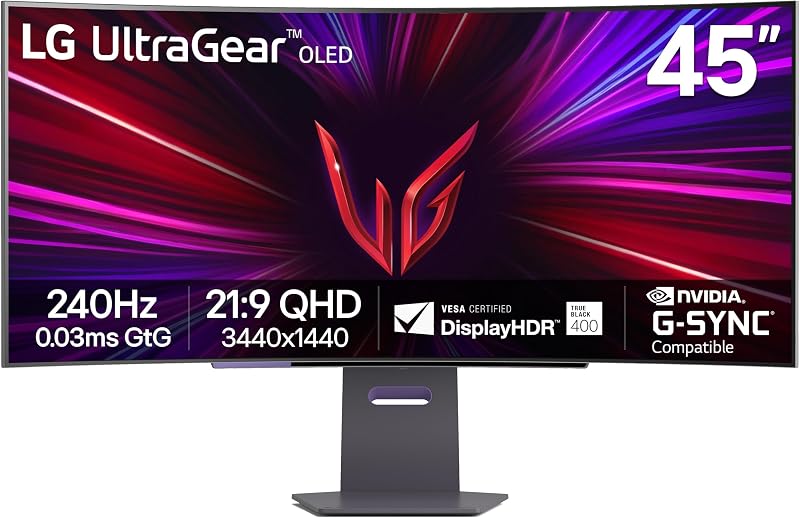
04 LG 45GS95QE Ultragear OLED Curved Gaming
Best for: High-brightness HDR gaming enthusiasts
Pros
- MLA layer boosts OLED brightness
- Immersive 800R curvature
- Sturdy ergonomic stand
Cons
- No built-in USB-C hub
- Lower pixel density for text
The LG 45GS95QE Ultragear OLED Curved Gaming is designed to solve one of the most common critiques of large OLED displays: daylight brightness. Utilizing Micro Lens Array (MLA) optical enhancement technology, this monitor delivers 275 nits of typical brightness and reaches bright highlights in HDR scenes. When coupled with DisplayHDR True Black 400 and a 1,500,000:1 contrast ratio, illuminated spells and explosions retain punch without washing out in moderately lit rooms.
Like its sibling displays in the 800R family, this screen uses an ultrawide 21:9 aspect ratio that offers 12 percent more physical display area than a 49-inch 32:9 screen. It includes a heavy-duty three-way adjustable stand that supports tilt, height, and swivel adjustments, letting users fine-tune their focal distance to match the deep 800R curvature. Both NVIDIA G-SYNC compatibility and AMD FreeSync Premium Pro are supported out of the box to prevent screen tearing.
- Micro Lens Array (MLA) optical layer boosting typical panel brightness
- 240Hz refresh rate with 0.03ms GtG pixel response
- DisplayHDR True Black 400 certification with 1.5M:1 contrast
- Fully ergonomic stand with tilt, height, and swivel adjustments
Unlike the GX series, the listing for the GS95QE does not specify an integrated USB-C video and power delivery hub. Users who plan to connect a modern thin-and-light laptop with a single charging cable may prefer the GX900A-B or GX950A-B.
05 LG Ultragear 45GX90SA 45-inch OLED 240Hz
Best for: Hybrid bedroom and cloud gaming spaces
Pros
- Integrated webOS smart streaming
- Native cloud gaming apps
- Fast 240Hz OLED performance
Cons
- Lower text clarity than 5K2K
- 65W power limit for laptops
The LG Ultragear 45GX90SA 45-inch OLED 240Hz transforms the traditional curved gaming monitor into an all-in-one entertainment station by integrating LG’s webOS smart platform directly into the display hardware. This allows users to stream shows via Netflix, Prime Video, and Disney+, or jump straight into gaming via cloud services such as GeForce NOW and Amazon Luna without turning on a connected desktop or console.
Underneath the smart interface lies a dedicated high-performance gaming panel. Sporting a 44.5-inch viewable OLED screen with an 800R curvature, it provides 3440 x 1440 resolution, a 240Hz refresh rate, and 0.03ms response times. The inclusion of HDMI 2.1 ports and a 65W USB-C Power Delivery connection makes it equally capable as a docked workstation screen or an entertainment display for modern consoles.
- Integrated webOS platform for native video streaming and cloud gaming
- Ultra-responsive 240Hz OLED panel with 0.03ms response time
- Curved 800R immersion with 98.5% DCI-P3 color gamut
- USB-C connectivity with 65W power delivery and HDMI 2.1
This screen is a dream for minimalists who want one screen for gaming, streaming, and light productivity. However, those who already run a dedicated media streaming setup or prefer a strictly passive display without an on-board operating system can look to the standard GX900A or GS95QE.
06 LG 45 inch Ultragear OLED WQHD
Best for: Turnkey workstation and console streaming bundles
Pros
- Includes 26-month protection plan
- Comes with two 4K HDMI cables
- Standalone webOS and remote control
Cons
- Bulkier purchase package
- Lower density for desktop text
The LG 45 inch Ultragear OLED WQHD package is a comprehensive retail bundle centered around the webOS-enabled 45GX90SA-B display. Designed for buyers who want an immediate out-of-the-box solution, this package includes the 44.5-inch 240Hz 800R smart OLED monitor along with two Deco Gear 6-foot 4K HDMI 2.0 cables and an exclusive 26-month CPS enhanced protection plan.
Having extended coverage is especially appealing for users setting up an OLED display for mixed work and entertainment, providing long-term peace of mind against unforeseen panel defects. The monitor itself retains all core capabilities of the standalone model, including 0.03ms response times, 1.5M:1 contrast, cloud gaming services, and a dedicated remote control for toggling between desktop productivity inputs and streaming applications.
- Includes 26-month CPS extended service protection plan
- Comes bundled with two 6-foot 4K HDMI cables
- Integrated webOS smart platform with dedicated remote control
- 240Hz refresh rate and 0.03ms response on an 800R OLED screen
This bundle is best suited for shoppers who want accessories and warranty coverage included in a single order. If you already own high-speed cables and do not need third-party protection policies, buying the unbundled unit may be more straightforward.
What Sets These Models Apart
| Model | Panel Type & Resolution | Refresh Rate & Response | Aspect Ratio & Curvature | Key Connectivity |
|---|---|---|---|---|
| LG 45GX950A-B | OLED (5120 x 2160 WUHD) | 165Hz (330Hz FHD) / 0.03ms | 21:9 Curved | DisplayPort 2.1, USB-C 90W |
| LG 45GR75DC-B | VA (5120 x 1440 DQHD) | 200Hz / 1ms | 32:9 Curved | HDMI 2.1, DP 1.4, USB-C 90W |
| LG 45GX900A-B | OLED (3440 x 1440 WQHD) | 240Hz / 0.03ms | 21:9 (800R) | HDMI 2.1, DP, USB-C 65W |
| LG 45GS95QE | OLED MLA (3440 x 1440 WQHD) | 240Hz / 0.03ms | 21:9 (800R) | HDMI 2.1, DisplayPort |
| LG 45GX90SA | OLED Smart (3440 x 1440 WQHD) | 240Hz / 0.03ms | 21:9 (800R) | HDMI 2.1, USB-C 65W, webOS |
| LG 45 inch Bundle | OLED Smart (3440 x 1440 WQHD) | 240Hz / 0.03ms | 21:9 (800R) | HDMI 2.1, USB-C 65W, Bundle Pack |
Buying Tips for LG 45-inch Monitors
Desk depth and viewing distance are the most critical physical factors when selecting an ultrawide in this size class. The 800R curvature found across LG’s 21:9 OLED models is notably aggressive, meaning the sides of the display curve significantly inward toward your seating position. To view the entire screen without excessive head turning, plan for a desk that is at least 30 to 36 inches deep. If your workstation has limited depth, the wider 32:9 profile of the 45GR75DC-B offers a flatter layout that sits further back against a wall.
Graphics processing bandwidth is another crucial consideration. While running a standard 3440 x 1440 OLED at 240Hz can be handled by many current graphics cards via DisplayPort 1.4 or HDMI 2.1, driving the 5K2K WUHD resolution on the 45GX950A-B pushes over 11 million pixels. To take full advantage of that screen’s high refresh rate without heavy compression, your system should ideally feature modern DisplayPort 2.1 output capabilities. If you prefer high-density displays in a smaller desktop footprint, exploring an lg 27 4k display may be worth considering.
Finally, consider how you handle day-to-day productivity. For an lg 45 oled monitor setup used primarily for spreadsheet work, code review, or word processing, text clarity is paramount. The 45GX950A-B’s 125 PPI density and updated subpixel structure render text far more cleanly than the 83 PPI found on 3440 x 1440 45-inch screens. Alternatively, if your workday revolves around multiple source devices, the built-in KVM and PbP features on the 45GR75DC-B allow you to split your workspace seamlessly without worrying about OLED burn-in mitigation routines.
FAQ
Which LG 45 monitor is best for office work?
The LG 45GX950A-B is the premier choice for office work because its 5K2K WUHD resolution provides 125 PPI density, ensuring sharp, legible text without the color fringing often seen on lower-resolution ultrawides. If your workflow requires running two computers at once, the LG 45GR75DC-B is another strong option due to its 32:9 dual QHD resolution and integrated KVM switch.
Is an 800R curve too aggressive for everyday use?
The 800R curve is engineered to match the natural peripheral arc of human vision at close range. While it feels dramatic initially, it reduces eye and neck movement when gaming or managing multiple open windows. However, architects and technical illustrators who rely on perfectly straight horizontal lines on screen may take time to adapt to the inward bend.
Can the USB-C port charge my laptop while displaying video?
Yes, models equipped with USB-C support video display and device charging simultaneously over a single cable. The 45GX950A-B and 45GR75DC-B deliver up to 90W of power delivery, which is sufficient for power-hungry laptops, while the 45GX900A-B and 45GX90SA provide 65W of power delivery.
What are the benefits of webOS on a gaming monitor?
Having webOS built into monitors like the 45GX90SA allows the screen to operate as an independent smart TV. You can stream media apps like Netflix and Prime Video or play cloud games through services like GeForce NOW without turning on a computer or gaming console.
What graphics card do I need to run a 5K2K 45-inch monitor?
Running games at 5120 x 2160 at high frame rates requires a high-performance modern graphics card. To fully utilize the 165Hz refresh rate over DisplayPort 2.1 without aggressive display stream compression, modern GPUs with DP 2.1 or HDMI 2.1 support are highly recommended.