As Amazon Associates, we earn from qualifying purchases. This means we may receive a small commission at no extra cost to you if you click through and make a purchase.
Finding the right dual display setup is one of the fastest ways to reclaim desk space and improve posture during long workdays. Whether you are managing spreadsheets, writing code, or alternating between sitting and standing, mounting your screens on dedicated arms clears bulky factory stands off your desktop and allows you to align your panels at proper eye level. A quality huano dual monitor setup eliminates neck stiffness by letting you adjust height, tilt, and focal distance instantly.
This guide compares five distinct dual monitor mounts manufactured by HUANUO to help you choose the best configuration for your workspace. While every model here is designed to elevate two displays securely, they differ significantly in arm mechanisms, weight capacities, maximum screen sizes, and specialized functions such as laptop integration or vertical stacking. Evaluating your display weights, desk thickness, and adjustment habits will ensure you select the huanuo dual monitor mount that matches your daily routine.
Which HUANUO Dual Monitor Mount Should You Buy
Best for: Sturdy set-and-forget steel workspace setups
Pros
- Heavy toughened steel fabrication
- 10-year manufacturer warranty
- 16 inches of pole height adjustment
Cons
- Lacks dynamic one-touch counterbalanced lifting

Best for: Professionals integrating laptops with dual displays
Pros
- Holds two screens plus 17-inch laptop
- Wide tilt range up to 85 degrees
- Clears extensive desktop area
Cons
- Larger overall footprint during assembly

Best for: Heavy 32-inch monitors needing deep reach
Pros
- 22-pound arm capacity
- Aerospace-grade aluminum construction
- 5-inch arm extension
Cons
- Clamp limited to 2.56-inch desks
- For heavy 32-inch displays requiring smooth reach and maximum weight support: HUANUO Dual Monitor Mount for 2
- For vertically stacked screens or standing desks needing high vertical elevation: HUANUO 17-32 Inch Dual Monitor Stand
- For compact screens up to 27 inches with finger-touch tension adjustment: HUANUO FlowLift Pro Dual Monitor Mount
- For mobile professionals who need to mount a notebook alongside two screens: HUANUO Dual Monitor and Laptop Mount
- For rigid, budget-friendly steel construction with set-and-forget stability: HUANUO Dual Monitor Mount for 2
01 HUANUO Dual Monitor Mount for 2
The HUANUO Dual Monitor Mount for 2 is engineered for workstations carrying heavier, larger panels that demand rock-solid stability. Constructed from aerospace-grade aluminum alloy, this mount provides an upgraded weight capacity capable of supporting up to 22 pounds per arm. If you work with modern 32-inch curved or flat-panel monitors that cause lesser arms to sag, this model maintains steady tension so your screens remain firmly in position throughout intense typing sessions.
Flexibility is a standout quality of this arm assembly, offering 17.5 inches of forward extension and up to 17.5 inches of elevation above your work surface. The joints deliver 360-degree rotation, 90-degree swivel in either direction, and tilt angles ranging from positive 90 degrees down to negative 35 degrees to counteract overhead lighting glare. If your daily productivity relies on running specialized hardware like a plugable usb-c dual 4k hdmi docking station to drive high-resolution panels, having this degree of smooth articulation ensures both screens sit flush without awkward gaps.
This mount is best suited for power users who frequently pull their screens closer for detailed drafting or push them back during collaborative discussions. However, if your setup requires stacking one display directly over the other on an extra-tall center pole, this horizontal-reach model gives way to taller pole-based configurations.
- Aerospace-grade aluminum alloy build holding up to 22 pounds per arm
- Accommodates flat and curved monitors from 17 to 32 inches with VESA 75x75mm or 100x100mm
- Dynamic range with 17.5 inches of extension and 17.5 inches of height adjustment
- Fast installation supporting C-clamp desks up to 2.56 inches and grommet holes up to 2.17 inches
02 HUANUO 17-32 Inch Dual Monitor Stand

Best for: Vertical stacked displays and tall desks
Pros
- Elevates up to 25.19 inches
- Supports stacked monitor configurations
- Accommodates desks up to 3.54 inches
Cons
- Maximum 45-degree tilt angle
Known under model number HNDS8, the HUANUO 17-32 Inch Dual Monitor Stand is built around an extended vertical architecture that caters to tall users and specialized viewing arrangements. Featuring an additional 17-inch pole extension, this system can elevate your screens up to 25.19 inches above the desktop. This extra clearance makes it an exceptional choice for standing desk converters or tall individuals who struggle to bring their displays up to natural eye level with conventional mounts.
Beyond standard side-by-side positioning, the huanuo hnds8 is designed to support stacked monitor orientations. Users who monitor real-time communications, financial charts, or live security feeds can place one 32-inch panel directly over the other to conserve horizontal space. Each arm supports screens up to 19.8 pounds and features integrated cable channels that guide power and display wiring neatly along the metal frame to prevent desktop clutter.
This stand is ideal for professionals seeking vertical arrangements or maximum height range on desktops up to 3.54 inches thick. Where it gives way to other models is in smaller cubicles, as its tall pole and articulation arms require adequate rear clearance behind the desk to adjust freely.
- Tall center column delivering maximum screen elevation up to 25.19 inches
- Dual-purpose engineering supporting side-by-side or stacked vertical screen layouts
- Full articulation with 180-degree swivel, 360-degree rotation, and 45-degree tilt
- Heavy-duty clamp and grommet mounting accommodating thick desk surfaces up to 3.54 inches
03 HUANUO FlowLift Pro Dual Monitor Mount
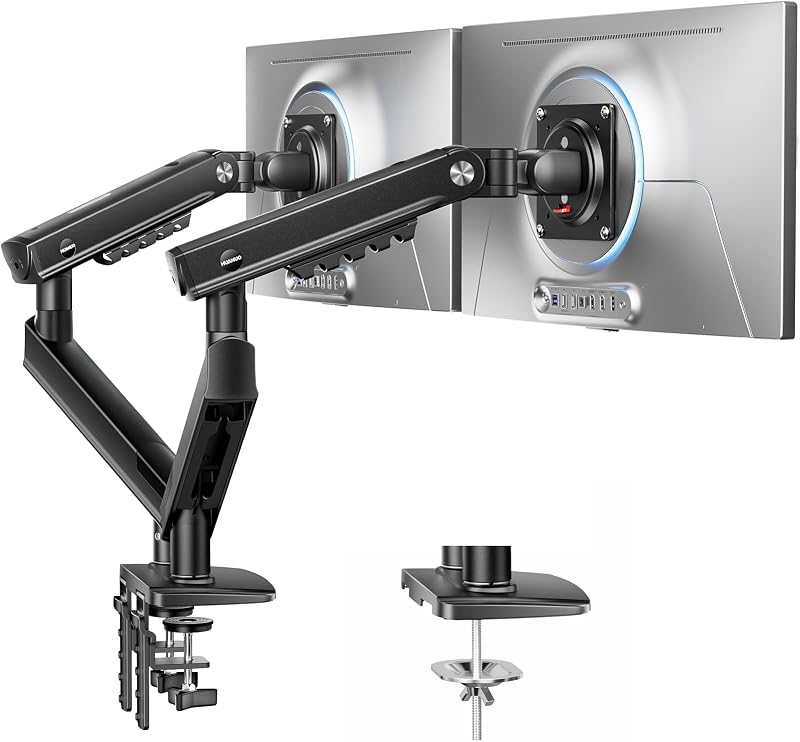
Best for: Frequent screen adjustments on compact desks
Pros
- Durable MechaSpring mechanism
- InstaMount tool-free VESA plates
- PrecisionView visual tension indicator
Cons
- Limited to 27-inch displays
- 4-pound per-arm weight limit
The HUANUO FlowLift Pro Dual Monitor Mount represents a mechanical leap forward for setups utilizing screens between 13 and 27 inches. Moving away from standard gas springs, the huanuo flowlift pro uses an internal MechaSpring mechanism paired with dual C-clamps designed for twice the operational lifespan. The arm movement is endorsed by the American Chiropractic Association for its ability to encourage healthy spinal alignment through effortless screen adjustments.
Precision calibration is made simple through the integrated PrecisionView tension window, which shows a yellow indicator that moves as you tighten or loosen the spring. This eliminates the guesswork often involved in balancing arms to match monitor weights between 4.4 and 15.4 pounds. Mounting your panels is equally streamlined thanks to the InstaMount tool-free VESA plates, allowing you to click the monitors onto the arms securely without fumbling behind screens with screwdrivers.
This setup is tailored for coders, writers, and data analysts who work with standard dual 24-inch or 27-inch screens and desire single-finger re-positioning throughout the day. It gives way, however, to the larger HUANUO mounts when you intend to install ultrawide or 32-inch displays that exceed its 15.4-pound arm threshold.
- MechaSpring mechanical arm system engineered for double the service longevity
- InstaMount tool-free quick-release VESA plate mechanism for instant monitor attachment
- PrecisionView visual tension window providing clear mechanical feedback during setup
- Ergonomic design backed by the American Chiropractic Association with a 5-year warranty
04 HUANUO Dual Monitor and Laptop Mount
For hybrid workers who dock a portable machine at their home workstation, the HUANUO Dual Monitor and Laptop Mount provides an all-in-one productivity hub. Instead of balancing your computer on a separate riser, this 3-in-1 mounting assembly includes articulated arms capable of supporting two 32-inch monitors up to 17.6 pounds each while simultaneously holding a 17-inch notebook on an integrated tray platform.
Integrating your laptop onto an articulated arm allows you to align the notebook screen alongside your external displays for a cohesive multi-screen workspace. If you run dual external monitors from a multi-display splitter such as a splitextend hdmi splitter extended display for dual monitor setup, the laptop tray keeps your primary device elevated off the desk surface, freeing up room for external keyboards, mice, and paperwork. The monitor arms provide 360-degree rotation, 90-degree swivel, and a wide tilt span from positive 85 to negative 90 degrees.
This mount is the ultimate option for remote workers and creative professionals who rely on their laptop screen as a secondary reference monitor. It gives way to simpler dual-screen arms if you work exclusively with a desktop computer tower, as the included laptop tray adds unnecessary footprint when unneeded.
- Integrated 3-in-1 workstation support for two 32-inch monitors and one 17-inch laptop
- Vented notebook tray that elevates portable computers to eye level
- Independent arm movement with 360-degree rotation and full swivel flexibility
- Compatible with desk thicknesses up to 3.15 inches via C-clamp and 2.36 inches via grommet
05 HUANUO Dual Monitor Mount for 2
Carrying the manufacturer designation HNCM7, this version of the HUANUO Dual Monitor Mount for 2 focuses on rugged durability and rock-solid screen stability. Fabricated from toughened heavy steel, the huanuo hncm7 can hold two monitors up to 32 inches with a maximum weight capacity of 17.6 pounds per arm. The rigid center-pole design is built to eliminate wobbling, making it an excellent choice for desks on carpeted floors or lighter tabletop surfaces.
The mount offers 16 inches of height adjustment along its vertical pole, alongside 180 degrees of swivel, 360 degrees of rotation, and 45 degrees of tilt in either direction. Once you lock the heavy-duty joints at your chosen viewing height and angle, the steel assembly keeps both displays locked together without shifting over time. It also incorporates concealed cable management clips that route wires directly down the rear pole, instantly clearing more than 50 percent of usable desktop space.
This steel mount is ideal for users who prefer a rigid set-and-forget workstation and want the peace of mind offered by an extensive 10-year warranty. It gives way to dynamic counterbalanced models like the aerospace-aluminum or MechaSpring variants if you require frequent, one-handed height adjustments throughout your workday.
- Heavy toughened steel fabrication with a 10-year manufacturer warranty
- Supports two displays up to 32 inches and 17.6 pounds per side
- Provides 16 inches of manual vertical adjustment along the center steel pole
- Dual mounting hardware supporting C-clamp and grommet setups on desks up to 3 inches thick
What Sets These Models Apart
| Model | Screen Size Limit | Weight Capacity Per Arm | Desk Thickness Range | Core Material / Arm Mechanism |
|---|---|---|---|---|
| HUANUO Dual Monitor Mount for 2 | Up to 32 inches | 22.0 lbs | 0.39 to 2.56 in (Clamp) / 2.17 in (Grommet) | Aerospace-Grade Aluminum Alloy |
| HUANUO 17-32 Inch Dual Monitor Stand | Up to 32 inches | 19.8 lbs | 0.39 to 3.54 in (Clamp and Grommet) | Tall Pole with 17-inch Extension |
| HUANUO FlowLift Pro Dual Monitor Mount | 13 to 27 inches | 4.4 to 15.4 lbs | The listing does not specify exact clamp depth | MechaSpring with PrecisionView Window |
| HUANUO Dual Monitor and Laptop Mount | Up to 32 inches + 17 in Laptop | 17.6 lbs per screen | 0.39 to 3.15 in (Clamp) / 2.36 in (Grommet) | Triple Arm System with Vented Notebook Tray |
| HUANUO Dual Monitor Mount for 2 | Up to 32 inches | 17.6 lbs | 0.39 to 3.00 in (Clamp and Grommet) | Toughened Heavy Steel Column |
Buying Tips for HUANUO Dual Monitor Mounts
Conducting a thorough huanuo dual monitor arm comparison starts with weighing your display panels without their original factory bases attached. While modern slim-bezel monitors are relatively lightweight, curved displays place their center of gravity further forward, which exerts higher rotational torque on the VESA bracket. Selecting an arm that accommodates at least three to four pounds beyond your display’s bare weight ensures long-term stability and prevents forward tilting.
Desk construction is another critical variable when determining which huanuo dual monitor mount to buy. Solid hardwood, thick bamboo, and steel-reinforced office desks handle high-clamping forces without difficulty. However, if your desktop is made of hollow-core honeycomb cardboard or thin manufactured particleboard, you should consider using a reinforcement plate or opting for grommet mounting to distribute the clamping load evenly across a wider surface area.
Finally, consider how frequently you interact with your displays. A dynamic mechanical or gas-assisted arm is the best huanuo monitor arm for desk setup routines where you regularly alternate between sitting and standing, or share screens during meetings. In contrast, fixed steel pole systems are ideal if your desk space is tight against a wall and you prefer locking your screens into a permanent ergonomic sweet spot.
FAQ
Can I mount different sized monitors on the same HUANUO dual arm?
Yes, you can mount mismatched monitor sizes as long as each screen falls within the specified size and weight limits for that specific model. When using dual-arm systems with independent articulation, each screen can be positioned at its own distance and angle. For fixed-pole setups, you may need to adjust the individual VESA bracket heights to ensure the horizontal centers of mismatched screens align comfortably.
How do I adjust the arm tension so my monitors do not droop?
HUANUO arms with mechanical or counterbalanced tension systems feature an adjustment bolt located at the joint of each arm. Once your monitor is securely attached to the VESA plate, turn the bolt toward the plus symbol using the included hex key if the screen droops downward. If the arm springs upward forcefully, turn the bolt toward the minus symbol until the display floats effortlessly in place.
Will a HUANUO dual monitor mount work on a glass desk?
Most monitor arm manufacturers, including HUANUO, do not recommend installing clamp or grommet mounts directly onto tempered glass desktops. The concentrated clamping pressure combined with the leverage of two extended monitors can cause tempered glass to shatter unexpectedly. For glass desks, a free-standing desktop base is generally the safer alternative.
What VESA patterns do these HUANUO dual monitor arms support?
All five HUANUO models featured in this guide support standard 75x75mm and 100x100mm VESA hole patterns. Before purchasing, verify the rear panel of your monitor has four mounting holes spaced either 75 millimeters or 100 millimeters apart in a square configuration. If your monitor has a proprietary bracket or a curved back with recessed screw holes, you may need to use the spacers included in the hardware bag.
Can I rotate my screens into portrait mode on all HUANUO mounts?
Every HUANUO mount reviewed here provides full 360-degree VESA plate rotation, allowing you to position your screens in either landscape or portrait orientation. When running a screen vertically, verify that your display cables have sufficient slack to accommodate rotation without pulling taut against the arm joints or unplugging from your computer.