As Amazon Associates, we earn from qualifying purchases. This means we may receive a small commission at no extra cost to you if you click through and make a purchase.
Setting up an efficient desk often comes down to choosing the right display, and an lg smart monitor 34 inch curved configuration has become a premier choice for consolidating office work and media playback. Rather than crowding a workspace with external streaming sticks and secondary monitors, an lg webos curved monitor integrates standalone entertainment and cloud tools directly into the panel. The expansive 21:9 ultrawide aspect ratio paired with a gentle 1800R curvature creates an immersive field of view that matches your natural sightline, keeping spreadsheets, reference tabs, and collaboration apps in easy reach without a desktop bezel dividing your focus.
In this focused lg 34 inch curved monitor comparison, we examine six models from the lineup to help you determine which lg curved smart monitor to buy for your daily workflow. These displays span two distinct design philosophies: all-in-one smart displays featuring the webOS streaming platform with wireless mobile casting, and dedicated productivity panels equipped with hardware multi-source window management or high-refresh visual engines. Exploring how each monitor handles single-cable power delivery, physical adjustments, and computer inputs will guide you to the perfect desk setup.
Which LG Curved Smart Monitors Should You Buy
- Everyday Home Office and Standalone Streaming: Choose the LG 34SR60QC-W 34-inch QHD for a clean white finish, webOS23 media apps, and direct cloud PC tools.
- Single-Cable Laptop Charging: Select the LG 34SR63QA-W 34 inch Smart Curved to combine smart television features with 65W USB Type-C power delivery.
- Hands-Free Voice Control: Pick the LG 34SR65QC-B 34 Inch Smart Monitor for its included LG Magic Remote and bundled accessories.
- Glare-Resistant Workspaces: Opt for the LG 34″ Curved UltraWide WQHD(3440×1440) Smart for an anti-glare screen coating paired with an adjustable stand.
- Dual-Computer Workstations: Choose the LG 34WR55QK-B 34-inch UltraWide WQHD for hardware Picture-by-Picture multitasking, DisplayPort, and 65W USB-C connectivity.
- Fluid Motion and Rapid Multitasking: Go with the LG 34U60ZB-B 34-inch UltraWide WQHD 120Hz for a 120Hz refresh rate, Black Stabilizer, and LG Switch desktop management.
01 LG 34SR60QC-W 34-inch QHD
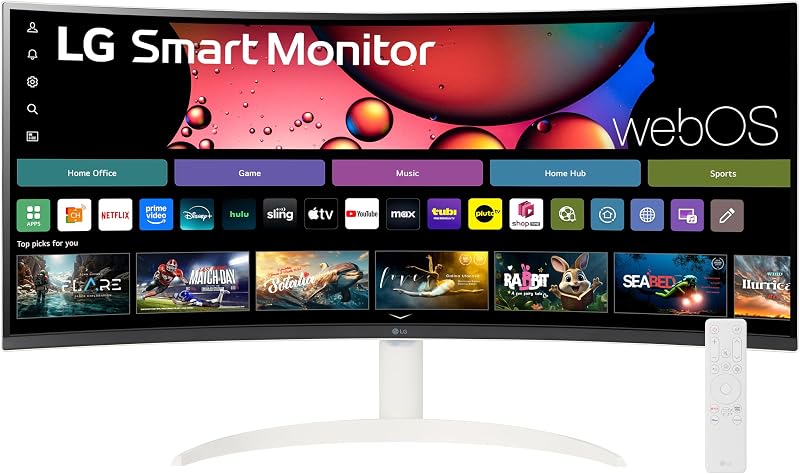
Best for: Wireless streaming and cloud desktop setups
Pros
- Built-in webOS23 with streaming channels
- Direct Microsoft 365 cloud access
- Apple AirPlay 2 and HomeKit support
Cons
- Lacks USB-C power delivery
- Tilt-only stand without height adjustment
The LG 34SR60QC-W 34-inch QHD acts as a hybrid display that functions both as an expansive desktop workstation and an independent smart television. Driven by a 3440×1440 resolution across a 21:9 ultrawide canvas, it delivers 34% more viewing area than traditional 16:9 widescreen panels. The integrated webOS23 platform provides native access to Netflix, Prime Video, the Apple TV app, Disney+, HBO Max, and over 300 free LG Channels, allowing you to relax after hours without booting up a connected computer. Remote workers can also access Microsoft 365 and Google workspace applications directly from the cloud without an attached PC.
Equipped with a VA panel boasting a 3000:1 static contrast ratio, 300 nits of brightness, and 99% sRGB color gamut coverage, this monitor displays sharp text alongside vibrant HDR10 video. Connectivity revolves around two HDMI inputs and three USB ports, supported by Apple AirPlay 2, HomeKit integration, Bluetooth, and the ThinQ mobile app for straightforward wireless screen casting and audio control. It features built-in speakers and a smooth 100Hz refresh rate, though its stand provides tilt adjustments rather than height mobility. This model fits professionals who already use a stationary desktop PC or an external laptop dock and prefer a minimalist white exterior.
Shoppers setting up an lg ultra wide 34 inch monitor layout will find that the gentle 1800R curve wraps comfortably around peripheral vision, reducing eye strain during long working hours. It yields a clean, self-contained desktop footprint that eliminates the need for standalone streaming hardware and auxiliary desktop speakers.
- Autonomous webOS23 software with built-in streaming apps and 300 plus free LG Channels
- Curved 1800R VA display with 3440×1440 resolution, 3000:1 contrast, and 100Hz refresh rate
- Comprehensive wireless control via Apple AirPlay 2, HomeKit, Bluetooth, and ThinQ app
- Optimized work-from-home platform supporting Microsoft 365 and Google cloud services
02 LG 34SR63QA-W 34 inch Smart Curved
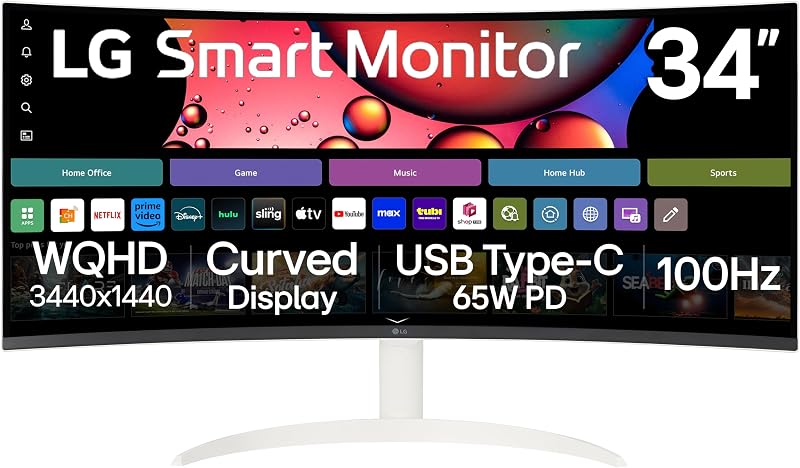
Best for: Clean single-cable laptop work desks
Pros
- USB Type-C with 65W power delivery
- Integrated webOS23 streaming platform
- 3-side virtually borderless design
Cons
- Fixed-height stand mechanism
- No hardware Picture-by-Picture
The LG 34SR63QA-W 34 inch Smart Curved expands on the connected smart screen concept by adding high-utility USB Type-C connectivity. Through a single cable, the USB-C port transfers video, carries peripheral data to two USB 3.0 ports, and supplies up to 65W of power delivery to recharge compatible modern laptops. Housed in a clean white chassis with a 3-side virtually borderless design and a slim flat base, it creates an elegant visual anchor for modern home offices.
Performance remains strong across both productivity and media consumption, using a 3440×1440 WQHD VA panel with an 1800R curve, 100Hz refresh rate, 3000:1 contrast ratio, and 300 nits brightness. Running webOS23, the display delivers standalone streaming apps, hundreds of free live channels, and direct cloud PC access for Microsoft 365 and Google apps. It also includes integrated stereo speakers, a dedicated headphone jack, two HDMI ports, and wireless casting via Apple AirPlay 2 and HomeKit.
This model is an exceptional match for telecommuters seeking an lg 34 inch ultrawide curved monitor for home office setups where laptop docking speed matters. You can plug in one cord to charge and display your notebook, then switch straight over to streaming television once the workday ends. Those requiring dual-system input splitting or vertical height adjustment, however, will want to evaluate models featuring specialized ergonomic stands.
- Versatile USB Type-C port supplying data, video transmission, and 65W power delivery
- Built-in webOS23 streaming interface with standalone cloud PC productivity access
- Curved 21:9 WQHD screen featuring 99% sRGB color gamut coverage and HDR10
- Clean white aesthetic with a 3-side borderless bezel and tilt-adjustable flat stand
03 LG 34SR65QC-B 34 Inch Smart Monitor

Best for: Ergonomic viewing with voice navigation
Pros
- Included LG Magic Remote with voice command
- Ergonomically adjustable height stand
- Standalone webOS23 with cloud tools
Cons
- No USB-C charging port
- Larger desktop footprint
The LG 34SR65QC-B 34 Inch Smart Monitor focuses on superior physical ergonomics and effortless navigation. Finished in black, this configuration bundles the curved display with an adjustable stand, an LG Magic Remote, an HDMI cable, and an integrated cable holder. The included Magic Remote elevates daily usability by introducing point-and-click cursor navigation and built-in voice commands, letting you switch inputs or search for media without reaching under the bezel for physical buttons.
Visual output is handled by a 3440×1440 VA panel with an 1800R radius that keeps wide window layouts equidistant from your eyes. The screen offers a 100Hz refresh rate, a 3000:1 contrast ratio, 300 cd/m² brightness, and HDR10 enhancement with color gamut enhancement technology. Powered by webOS23, it streams content independently, connects directly to cloud office tools like Microsoft 365, and receives wireless casting from Apple AirPlay 2 and HomeKit devices.
The standout advantage of this model is its adjustable stand, which allows you to raise or lower the display to match your natural eye level and reduce posture fatigue. It represents a complete, ready-to-use package for users who value intuitive remote control navigation and flexible physical positioning. Note that because this version relies on standard HDMI connections rather than USB-C power delivery, laptop users will need to retain their standard power adapter.
- Includes voice-controlled LG Magic Remote for point-and-click streaming navigation
- Ergonomically adjustable stand allowing tailored viewing height for daily neck comfort
- Expansive 3440×1440 WQHD VA panel with 1800R curvature and 100Hz refresh rate
- Autonomous webOS23 software supporting streaming channels and cloud office tools
04 LG 34″ Curved UltraWide WQHD(3440×1440) Smart
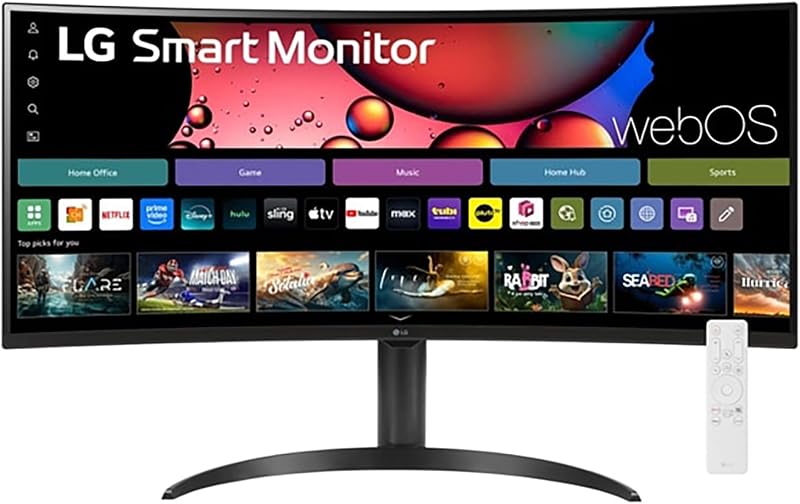
Best for: Anti-glare viewing and casual streaming
Pros
- Anti-glare screen surface finish
- Magic Remote voice and cursor control
- Ergonomic adjustable stand
Cons
- Lacks USB-C power delivery
- No hardware multi-input management
The LG 34″ Curved UltraWide WQHD(3440×1440) Smart monitor emphasizes optical comfort and media accessibility. Featuring an anti-glare screen surface, this 34-inch ultrawide display prevents distracting reflections from overhead office lights and nearby windows. The 21:9 curved layout surrounds your field of view with 3440×1440 resolution, 99% sRGB color coverage, and HDR10 support, ensuring accurate colors across documents, design assets, and entertainment streams.
Integrated webOS23 capabilities allow the monitor to stream from popular apps like Netflix, Prime Video, Disney+, and Apple TV without requiring an external computer or streaming stick. The included LG Magic Remote brings smooth on-screen cursor control and voice recognition, making it simple to manage settings and media from across the room. An adjustable stand provides physical elevation and angle options to ensure optimal posture throughout long working days.
This screen is well suited for shared spaces, bedrooms, or studio apartments where a single display must pull double duty as a glare-free productivity screen by day and an entertainment center by night. While it provides outstanding standalone smart television functionality and physical positioning, workstation users managing two separate computers simultaneously will find more tailored multi-input tools on dedicated non-smart office models.
- Anti-glare screen surface treatment designed to minimize reflections in bright rooms
- Includes LG Magic Remote supporting voice commands and point-and-click control
- Built-in webOS23 platform with access to leading streaming services and LG Channels
- Adjustable stand mechanism paired with an immersive 1800R curved 100Hz panel
05 LG 34WR55QK-B 34-inch UltraWide WQHD
Best for: Multi-device professional workstations
Pros
- Hardware Picture-by-Picture multitasking
- USB Type-C with 65W power delivery
- Height and tilt adjustable stand
Cons
- No built-in webOS streaming system
- Listing does not specify speakers
The LG 34WR55QK-B 34-inch UltraWide WQHD shifts the focus away from standalone smart television platforms to deliver a dedicated, hardware-rich computer workstation. Built around a 3440×1440 VA panel with a 3000:1 contrast ratio, 300 cd brightness, and 99% sRGB color gamut coverage, it features comprehensive physical ports including a USB Type-C port with up to 65W power delivery, DisplayPort, two HDMI inputs, two downstream USB ports, and a headphone output.
Productivity is elevated through LG OnScreen Control software, which enables rapid desktop window tiling with a few clicks. Crucially, the monitor supports hardware Picture-by-Picture (PbP), allowing you to display signals from two independent computers side by side on the same screen. Motion clarity is maintained by a 100Hz refresh rate and a 5ms response time, while built-in Reader Mode reduces blue light emissions to protect vision during extended document review.
For demanding office professionals juggling a corporate laptop alongside a home desktop, the LG 34WR55QK-B is a workhorse solution. Its ergonomic stand supports both height and tilt adjustments, enabling seamless positioning. While it does not include webOS streaming software, professionals comparing expansive screen setups might also evaluate an lg 45 monitor to weigh the spatial demands of larger ultrawide form factors before finalizing their setup.
- USB Type-C port supplying data, video transmission, and 65W laptop power delivery
- Picture-by-Picture (PbP) multi-tasking displaying two distinct input sources simultaneously
- Comprehensive port array with DisplayPort, two HDMI ports, and USB hub functionality
- Ergonomic stand offering height and tilt adjustability on a 3-side borderless chassis
06 LG 34U60ZB-B 34-inch UltraWide WQHD 120Hz
Best for: High-framerate PC computing and gaming
Pros
- 120Hz refresh rate and 5ms response
- LG Switch software with 11 layouts
- Space-saving slim stand with square base
Cons
- Lower 250 cd/m2 brightness rating
- Lacks USB Type-C power delivery
The LG 34U60ZB-B 34-inch UltraWide WQHD 120Hz elevates motion smoothness with an upgraded 120Hz refresh rate and a responsive 5ms response time. Operating across a 3440×1440 VA panel with an 1800R curve, it delivers fluid scrolling across long coding files and spreadsheets, sharp video calls, and responsive after-hours gaming. The panel features 250 cd/m² brightness, a 3000:1 static contrast ratio, and 99% sRGB coverage backed by HDR10 processing.
Desktop arrangement is powered by LG Switch software, which enables you to split your workspace into up to 11 custom layouts, assign hotkeys for instant profile toggles, and launch video conferencing tools instantly. Gaming and viewing enhancements include Black Stabilizer, which brightens shadowed regions without blowing out highlights, and Reader Mode, which shifts the color spectrum to warmer tones to relieve visual fatigue during late-night projects.
Desk space efficiency is a standout design feature of the LG 34U60ZB-B, which pairs a slim, space-saving stand with a compact square base that leaves ample room for keyboards and desktop accessories. The stand offers both height and tilt adjustments to fine-tune your ergonomic setup. Because it relies on DisplayPort and HDMI inputs without USB-C power delivery or integrated speakers, it is best suited for desktop tower users or those with dedicated laptop docks.
- Enhanced 120Hz refresh rate with 5ms response time for smoother scrolling and motion
- LG Switch desktop utility supporting up to 11 screen split layouts and hotkey mapping
- Space-saving slim stand with compact square base plus tilt and height adjustability
- Integrated Black Stabilizer and Reader Mode for balanced gaming and reading comfort
What Sets These Models Apart
| Model | Operating System / Software | Refresh Rate | Stand Adjustability | Key Connectivity |
|---|---|---|---|---|
| LG 34SR60QC-W | webOS23 with Cloud PC | 100Hz | Tilt Only | 2x HDMI, 3x USB, AirPlay 2 |
| LG 34SR63QA-W | webOS23 with Cloud PC | 100Hz | Tilt Only | USB-C (65W PD), 2x HDMI, 2x USB 3.0 |
| LG 34SR65QC-B | webOS23 with Cloud PC | 100Hz | Height and Tilt Adjustable | HDMI, Magic Remote Included |
| LG 34″ Curved UltraWide Smart | webOS23 Streaming | 100Hz | Height and Tilt Adjustable | HDMI, Magic Remote, AirPlay 2 |
| LG 34WR55QK-B | OnScreen Control (PbP) | 100Hz | Height and Tilt Adjustable | USB-C (65W PD), DP, 2x HDMI, USB Hub |
| LG 34U60ZB-B | LG Switch (Up to 11 Layouts) | 120Hz | Height and Tilt Adjustable | DisplayPort, HDMI, Headphone Jack |
Buying Tips for LG Curved Smart Monitors
When selecting a 34-inch curved screen, your first major decision is choosing between a standalone webOS smart monitor and a pure computer display. Models powered by webOS23 function as standalone entertainment stations, running streaming platforms and cloud office apps independently of an attached PC. This is ideal for minimal setups where one screen serves as a bedroom television and a work monitor. Conversely, if your workflow involves connecting two separate computers simultaneously or you rely on hotkey window tiling, a dedicated workstation display featuring Picture-by-Picture or LG Switch software will deliver a more focused computing experience.
Cable management and laptop charging capability represent another vital consideration for modern desks. If you work from a modern laptop, selecting a monitor equipped with a 65W USB Type-C port eliminates the clutter of proprietary power bricks and separate display cables. A single cord transfers the video signal, charges your computer, and routes peripheral accessories like mice and webcams directly through the monitor’s downstream USB ports. If you use a traditional desktop tower with a dedicated graphics card, DisplayPort and HDMI inputs remain standard, making USB-C pass-through less critical.
Finally, do not overlook physical ergonomics and desk depth. A 34-inch ultrawide screen covers considerable lateral space, and an 1800R curve brings the outer edges closer to your natural focal field to minimize neck turning. However, monitor stands with fixed vertical posts can force you to slouch or look upward. Opting for a model with an adjustable height stand ensures you can align the top third of the panel with your eye line, supporting healthy posture during long hours at your desk.
FAQ
Can an LG curved smart monitor run office applications without a computer?
Yes. The LG smart monitors running webOS23 include direct cloud PC functionality that allows you to sign into Microsoft 365 and Google workspace applications straight through the monitor. By pairing a Bluetooth keyboard and mouse directly to the screen, you can edit documents, manage spreadsheets, and browse online without connecting an external PC.
What are the benefits of an 1800R curvature on a 34-inch screen?
An 1800R curve means the monitor matches the circumference of a circle with an 1800-millimeter radius. Across a 34-inch ultrawide 21:9 screen, this curvature keeps the outer edges of the display roughly equidistant from your eyes, reducing eye fatigue and minimizing the head rotation required to view windows placed at the far sides of the desktop.
Do all LG 34-inch curved monitors include USB-C laptop charging?
No, USB Type-C connectivity varies by model across the lineup. Certain options like the LG 34SR63QA-W and the LG 34WR55QK-B include full-function USB Type-C ports capable of delivering up to 65W of power alongside video and data transfer. Other models in the family rely exclusively on HDMI and DisplayPort connections without integrated power delivery.
What is the difference between LG webOS and LG Switch software?
LG webOS is an onboard smart operating system embedded in the monitor hardware, allowing it to run streaming media apps, live channels, and cloud tools independently without a computer. LG Switch is a desktop utility installed on a connected computer that lets you control screen brightness, map hotkeys, and divide your desktop into up to 11 custom window layouts for improved productivity.
Can I mirror content from an iPhone or Mac to these curved monitors?
Yes, the smart models featuring webOS23 incorporate Apple AirPlay 2 and Apple HomeKit support. This enables you to stream video, cast music, or wirelessly mirror screens from iOS and macOS devices directly to the ultrawide display without requiring an external Apple TV streaming device.