As Amazon Associates, we earn from qualifying purchases. This means we may receive a small commission at no extra cost to you if you click through and make a purchase.
Selecting an lg ultra wide 34 inch monitor comes down to balancing horizontal desktop real estate, display clarity, and cable management. For home and office workstations, replacing a cramped single display or an awkward dual-screen setup with an expansive 21:9 aspect ratio provides a continuous visual canvas without center bezels interrupting your view. LG designs these ultrawide panels to streamline daily productivity, whether you run wide financial spreadsheets, edit timeline-based projects, or manage multiple browser windows side by side. Evaluating panel curvature, native resolution, and refresh capabilities ensures your display matches the physical layout and daily demands of your workspace.
This article covers six 34-inch ultrawide monitors from LG, examining how their technical specifications influence daily routines. While all six share the wide 21:9 panoramic format, they diverge across essential hardware boundaries. Some feature an UltraWide Full HD panel for easy text legibility, while others employ a sharp 3440 x 1440 resolution. Refresh rates range between 100Hz and 120Hz for fluid scrolling, and connectivity options span from standard HDMI and DisplayPort inputs to single-cable USB Type-C hubs with laptop charging. By reviewing this lg 34 inch ultrawide monitor comparison, you can identify the exact model that complements your computing hardware and desk ergonomics.
Which LG Ultrawide Monitors Should You Buy
- For clean desks needing flat IPS viewing and straightforward window splitting: LG 34U530A-W 34-inch UltraWide WFHD provides reliable color, integrated speakers, and USB-C data connectivity.
- For high-refresh spreadsheets and fluid motion: LG 34U60ZB-B 34-inch UltraWide WQHD 120Hz delivers smooth navigation on a curved VA panel with deep contrast.
- For laptop power users wanting single-cable charging and dual-PC inputs: LG 34WR55QK-B 34-inch UltraWide WQHD offers 65W USB-C delivery and Picture-by-Picture support.
- For ergonomic desk setups requiring maximum stand flexibility at 120Hz: LG UltraWide 34 Inch WQHD HDR combines swivel, tilt, and height positioning on a renewed curved canvas.
- For hybrid desks that double as a standalone entertainment screen: LG 34SR60QC-W 34-inch QHD runs webOS with built-in streaming apps and wireless casting.
- For high-brightness curved workflows requiring sharp visuals: LG 34WR55QC-B 34″ Curved UltraWide WQHD delivers 400 cd/m² luminance with USB Type-C convenience.
01 LG 34U530A-W 34-inch UltraWide WFHD
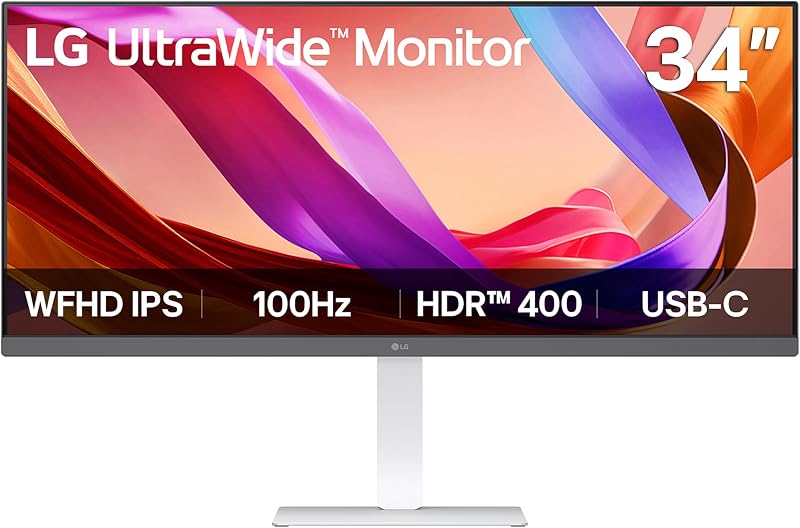
Best for: Everyday office productivity needing flat IPS viewing
Pros
- 100Hz refresh rate
- USB Type-C display and data connectivity
- Built-in Waves MaxxAudio stereo speakers
- DisplayHDR 400 with IPS panel
Cons
- Lower WFHD resolution
- Flat screen without curvature
The LG 34U530A-W 34-inch UltraWide WFHD brings an expansive 21:9 workspace to standard desktop tasks using an IPS panel. Operating at a resolution of 2560 x 1080, the display features a 0.31 mm pixel pitch that renders interface elements and documents larger than higher-density screens, reducing eye strain for users who prioritize legibility over fine pixel density. Its flat display surface is complemented by wide 178-degree viewing angles and a 1000:1 contrast ratio, ensuring color consistency across the entire horizontal field. The white chassis and narrow bezel create a clean aesthetic for modern home offices.
Everyday convenience is bolstered by integrated USB Type-C connectivity that handles display signals and data transfer over a single cable, alongside standard HDMI and DisplayPort inputs. Built-in stereo speakers powered by Waves MaxxAudio output clear sound without cluttering desk space with external hardware. Users organizing complex multitasking layouts can employ the LG Switch application to divide the screen into up to six customized zones or trigger video calls with a shortcut. When spending long hours reviewing text, Reader Mode shifts color temperatures to warmer hues for extended visual comfort.
This monitor suits office professionals and students seeking a flat, wide IPS display with built-in audio and straightforward laptop pairing. However, professionals who require crisp text rendering for small fonts or dense graphic timelines will prefer a higher-density 3440 x 1440 panel found elsewhere in the lineup.
- 2560 x 1080 WFHD resolution on a flat IPS panel with DisplayHDR 400
- USB Type-C port supporting display output and data transfer
- Built-in Waves MaxxAudio stereo speakers for desktop sound
- Stand with height, tilt, and swivel adjustability in a white finish
02 LG 34U60ZB-B 34-inch UltraWide WQHD 120Hz

Best for: High-refresh spreadsheet multitasking and gaming
Pros
- Fluid 120Hz refresh rate
- Curved 1800R WQHD panel
- Deep 3000:1 contrast ratio
- LG Switch with 11 layouts
Cons
- No USB Type-C connectivity
- Listing does not specify integrated speakers
The LG 34U60ZB-B 34-inch UltraWide WQHD 120Hz delivers an immersive visual experience with its subtle 1800R curved screen. Built with a 3440 x 1440 resolution, this lg 3440×1440 ultrawide monitor delivers crisp fidelity across data sheets and creative timelines with a tight 0.23 mm pixel pitch. Its VA display technology yields a high 3000:1 contrast ratio, allowing deep blacks to remain distinct alongside bright highlights. Running at 120Hz with a 5ms response time, the screen eliminates motion blur during fast navigation, while HDR10 and 99% sRGB color coverage keep content visually vibrant.
Desktop management is powered by the LG Switch utility, allowing users to customize workspace layouts into up to 11 configurations and adjust display settings through hotkeys. The physical footprint is optimized via a space-saving stand with a square base, incorporating height and tilt adjustments to align with ergonomic eye levels. Connectivity includes DisplayPort, HDMI, and a dedicated headphone jack, alongside a Black Stabilizer function designed to enhance visibility in darker video scenes. Reader Mode softens blue light exposure during lengthy working blocks.
This model suits power users and casual gamers who value a curved panel with a rapid 120Hz refresh rate and deep contrast. However, because the lg 34u60zb-b lacks USB Type-C power delivery and built-in speakers, users seeking a one-cable docking hub for laptops will find better utility in USB-C equipped alternatives.
- 3440 x 1440 WQHD curved VA panel with an 1800R curvature
- Fluid 120Hz refresh rate paired with a 5ms response time
- Deep 3000:1 contrast ratio with HDR10 and 99% sRGB coverage
- Ergonomic square-base stand offering tilt and height positioning
03 LG 34WR55QK-B 34-inch UltraWide WQHD

Best for: Laptop workstations needing single-cable charging
Pros
- USB Type-C with 65W power delivery
- Picture-by-Picture dual source support
- Sharp 3440 x 1440 resolution
- Ergonomic height and tilt stand
Cons
- 100Hz refresh rate cap
- Listing does not specify integrated speakers
The LG 34WR55QK-B 34-inch UltraWide WQHD functions as a dedicated productivity center for modern laptop and desktop arrangements. Featuring a curved 3440 x 1440 VA panel, this model provides high clarity with a 0.23 mm pixel pitch, 300 cd/m² brightness, and a 3000:1 contrast ratio. The gentle curvature keeps the outer edges of the 21:9 display within direct sight, minimizing head rotation across wide application windows. Supported by HDR10 and 99% sRGB color gamut coverage, visuals remain crisp whether analyzing spreadsheets or reviewing visual assets.
Port versatility makes the lg 34wr55qk-b a standout workstation anchor. Its USB Type-C port supports up to 65W power delivery alongside data and display transfer, recharging compatible notebooks through a single connection. The back panel also houses two HDMI ports, two USB downstream ports, a DisplayPort connection, and a headphone output. OnScreen Control software allows users to split windows easily and deploy Picture-by-Picture mode, displaying inputs from two separate computers simultaneously on one screen. The ergonomic stand allows tilt and height positioning to maintain comfort.
This screen is ideal for remote workers and professionals who juggle dual computers or seek an orderly desk via single-cable USB-C docking. Shoppers prioritizing higher refresh rates above 100Hz will naturally look toward 120Hz alternatives in the lineup.
- 3440 x 1440 curved VA display with a 100Hz refresh rate
- USB Type-C interface with up to 65W notebook charging power
- Dual-source Picture-by-Picture functionality via OnScreen Control
- Comprehensive connectivity including dual HDMI and dual USB ports
04 LG UltraWide 34 Inch WQHD HDR

Best for: Ergonomic setups wanting 120Hz motion flexibility
Pros
- Smooth 120Hz refresh rate
- Curved WQHD resolution canvas
- Stand with tilt, height, and swivel
- Swift 5ms response time
Cons
- Renewed hardware condition
- No USB-C power delivery
The LG UltraWide 34 Inch WQHD HDR offers a high-performance curved visual canvas under the Amazon Renewed program. Built around a 3440 x 1440 QHD Ultra Wide resolution, the curved LED screen surrounds your field of vision to create an immersive work and entertainment station. It features a fast 120Hz refresh rate coupled with a 5ms response time, generating seamless motion transitions when scrolling through extensive documents, editing video timelines, or enjoying fast-paced content. HDR 10 decoding enhances tonal depth and shadow definition across the 21:9 surface.
Physical ergonomics are central to this configuration. The included stand supports height, tilt, and swivel adjustments, making it easy to establish an optimal line of sight and reduce neck fatigue across long sessions. Connection points include HDMI and DisplayPort inputs, providing straightforward links to desktops, secondary laptops, and gaming consoles. Built-in Reader Mode reduces eye fatigue by modifying screen tones during text-heavy tasks, while 170-degree viewing angles preserve image clarity from varied sitting postures.
This model suits value-conscious professionals and gamers who want a 120Hz curved display paired with flexible swivel mechanics. However, because this renewed model does not integrate USB-C power delivery, users requiring a single-cable laptop dock should look to dedicated USB-C options.
- 3440 x 1440 curved LED display with a 120Hz refresh rate
- Rapid 5ms response time and HDR 10 visual processing
- Versatile ergonomic stand with tilt, height, and swivel adjustments
- Reliable connection options featuring DisplayPort and HDMI ports
05 LG 34SR60QC-W 34-inch QHD
Best for: Hybrid home office and standalone streaming setups
Pros
- Integrated webOS23 streaming platform
- Apple AirPlay 2 and HomeKit support
- Cloud PC access without a computer
- Built-in stereo sound
Cons
- No USB Type-C connectivity
- Larger 0.35 pixel pitch
Blurring the boundary between a traditional computer monitor and a smart entertainment hub, the LG 34SR60QC-W 34-inch QHD operates as an independent media and productivity station. Built with a 3440 x 1440 resolution on an 1800R curved VA panel, it features a 3000:1 contrast ratio, 300 cd/m² brightness, and 99% sRGB color gamut coverage. Encased in a white finish, the 100Hz display wraps around your visual field to provide immersive views for everyday multitasking, matching the functional depth of an lg smart monitor 34 inch curved display.
What separates the lg 34sr60qc-w from standard desktop panels is its integrated webOS23 operating system. Without turning on a PC, users can stream movies via Netflix, Prime Video, Disney+, and HBO Max, access over 300 free LG Channels, or run cloud productivity tools like Microsoft 365 and Google apps directly. Hardware versatility includes Apple AirPlay 2, HomeKit compatibility, Screen Share, Bluetooth, and built-in speakers. Physical interfaces offer two HDMI ports and three USB ports to accommodate external accessories and gaming systems.
This screen is specifically tailored for dorm rooms, studio apartments, or compact home offices where a single display must handle daily computer workflows and evening media streaming. Those who require USB Type-C single-cable power delivery will need to look at dedicated computer monitors in the lineup, as the listing does not specify USB-C charging on this unit.
- Integrated webOS23 with native streaming apps and cloud PC access
- Apple AirPlay 2, HomeKit, Screen Share, and Bluetooth connectivity
- 3440 x 1440 resolution on an 1800R curved VA screen at 100Hz
- Built-in speakers and dual HDMI ports with three USB ports
06 LG 34WR55QC-B 34″ Curved UltraWide WQHD
Best for: Bright desk setups requiring punchy IPS highlights
Pros
- Bright 400 cd/m² luminance
- USB Type-C port integration
- AMD FreeSync tear-free motion
- Crisp 3440 x 1440 curved display
Cons
- Lower 1300:1 contrast ratio
- Listing does not specify integrated speakers
The LG 34WR55QC-B 34″ Curved UltraWide WQHD delivers a refined balance of expansive resolution and elevated screen brightness. Engineered with a 3440 x 1440 curved display utilizing IPS display technology, it outputs an impressive 400 cd/m² brightness level that easily overcomes ambient window glare. The panel offers a 100Hz refresh rate and wide 178-degree viewing angles, supported by a 1300:1 contrast ratio, 95% color gamut coverage, and a fine 0.23 mm pixel pitch that delivers crisp graphical detail across spreadsheets and design canvases.
Visual fidelity is enhanced through dual HDR decoding, featuring both DisplayHDR 400 and HDR10 support for impactful highlights and lifelike contrast. For fast-paced visuals and casual gaming, AMD FreeSync technology synchronizes the screen refresh with compatible graphics hardware to eliminate screen tearing. Connectivity is streamlined through a USB Type-C port that manages modern laptop connectivity alongside a virtually borderless design that maximizes active screen area.
This monitor is an outstanding candidate when choosing the best lg 34 inch curved monitor for creative workers and office specialists who work in brightly lit environments where 400-nit luminance makes a distinct difference. However, users who require the highest possible contrast ratio for dark-room entertainment might prefer a 3000:1 VA panel model.
- 3440 x 1440 curved ultrawide display with IPS technology
- High 400 cd/m² luminance backed by DisplayHDR 400 and HDR10
- Smooth 100Hz refresh rate enhanced with AMD FreeSync
- Modern USB Type-C connectivity and borderless bezel styling
What Sets These Models Apart
While every display in this lineup shares a 34-inch 21:9 diagonal profile, their core panel architectures, refresh capabilities, and interface options create distinct functional profiles. The table below compares the foundational specifications of each model to assist you in deciding which lg 34 ultrawide to buy for your personal desk configuration.
| Model | Resolution | Refresh Rate | Panel Type & Contrast | USB-C Connectivity |
|---|---|---|---|---|
| LG 34U530A-W | 2560 x 1080 (WFHD) | 100Hz | Flat IPS (1000:1) | Display and data transfer |
| LG 34U60ZB-B | 3440 x 1440 (WQHD) | 120Hz | Curved VA (3000:1) | Not supported |
| LG 34WR55QK-B | 3440 x 1440 (WQHD) | 100Hz | Curved VA (3000:1) | 65W Power Delivery and data |
| LG UltraWide 34 Inch WQHD HDR | 3440 x 1440 (WQHD) | 120Hz | Curved LED (Listing does not specify) | Not supported |
| LG 34SR60QC-W | 3440 x 1440 (WQHD) | 100Hz | Curved VA (3000:1) | Not supported |
| LG 34WR55QC-B | 3440 x 1440 (WQHD) | 100Hz | Curved IPS (1300:1) | Supported |
Buying Tips for LG Ultrawide Monitors
Resolution and pixel density should be the primary consideration when evaluating these ultrawide displays. An UltraWide Full HD monitor like the lg 34u530a-w provides a 2560 x 1080 resolution with a 0.31 mm pixel pitch, making interface elements larger and easier to read without adjusting software scaling. Conversely, a 3440 x 1440 WQHD monitor features a 0.23 mm pixel pitch, delivering approximately 33 percent more desktop working area to comfortably view three full document windows side by side. If your workflow demands ultra-fine photographic editing or extreme vertical text density rather than horizontal width, contrasting these ultrawides with an lg ultra fine 4k monitor can clarify whether width or vertical pixel density serves you best.
Port selection fundamentally shapes your daily cable management and physical workspace clutter. Opting for an lg ultrawide usb c monitor simplifies notebook docking by channeling video, data, and power through a single cable. However, verify the exact capabilities of the port before finalizing your setup: models like the 34WR55QK-B provide up to 65W power delivery to keep your laptop battery replenished, whereas other USB-C implementations may be limited to display passthrough and data transfer without charging capabilities.
Curvature and mechanical adjustability play significant roles in maintaining ergonomic comfort throughout extended work hours. On a 34-inch horizontal panel, a gentle 1800R curve brings the far left and right edges closer into your peripheral vision, reducing continuous neck turning. Additionally, selecting a model with a stand that supports height, tilt, and swivel adjustments ensures you can set the top third of the panel at natural eye level, preventing slouching and spinal strain during demanding projects.
FAQ
Can a 34-inch ultrawide monitor replace a dual-monitor setup?
Yes, a 34-inch ultrawide display easily replaces a dual-monitor arrangement by providing an uninterrupted 21:9 visual field without center bezels. Utilizing splitting software such as LG Switch or OnScreen Control allows you to snap multiple windows into custom side-by-side configurations seamlessly.
What is the difference between WFHD and WQHD resolutions on these displays?
WFHD offers 2560 x 1080 pixels, rendering text and system icons larger for easy viewing without requiring software scaling. WQHD increases resolution to 3440 x 1440 pixels, providing higher pixel density, sharper graphic rendering, and significantly more horizontal screen real estate for multitasking.
Can an LG ultrawide monitor charge a laptop through USB Type-C?
Certain models with dedicated power delivery, such as the LG 34WR55QK-B, supply up to 65W of charging power over USB Type-C to power compatible notebooks. Other USB-C implementations may handle only display output and data transfer, so checking the specific power specification is essential.
How does the LG Switch app assist with window management?
The LG Switch application allows users to organize their screen into customized multi-window layouts, offering up to 11 configurations depending on the monitor. It also enables quick desktop display adjustments and hotkey controls to streamline everyday workflows and launch video meetings.
Can the LG smart ultrawide monitor stream television shows without a PC?
Yes, the LG 34SR60QC-W includes integrated webOS23, enabling native access to streaming platforms like Netflix, Prime Video, Disney+, and HBO Max directly over Wi-Fi, alongside cloud PC productivity tools, entirely independent of a connected computer.